














Paradiso Authoring Tool for Moodle
Build SCORM-Ready Moodle Courses in Minutes-Not Weeks
10×
Faster course creation
70+
Languages with AI voiceover & translation
100K+
Course creators using Paradiso worldwide
Trusted by 1000s of Companies Globally…


Built for Moodle
An Authoring Tool That Plugs Straight Into Your Moodle
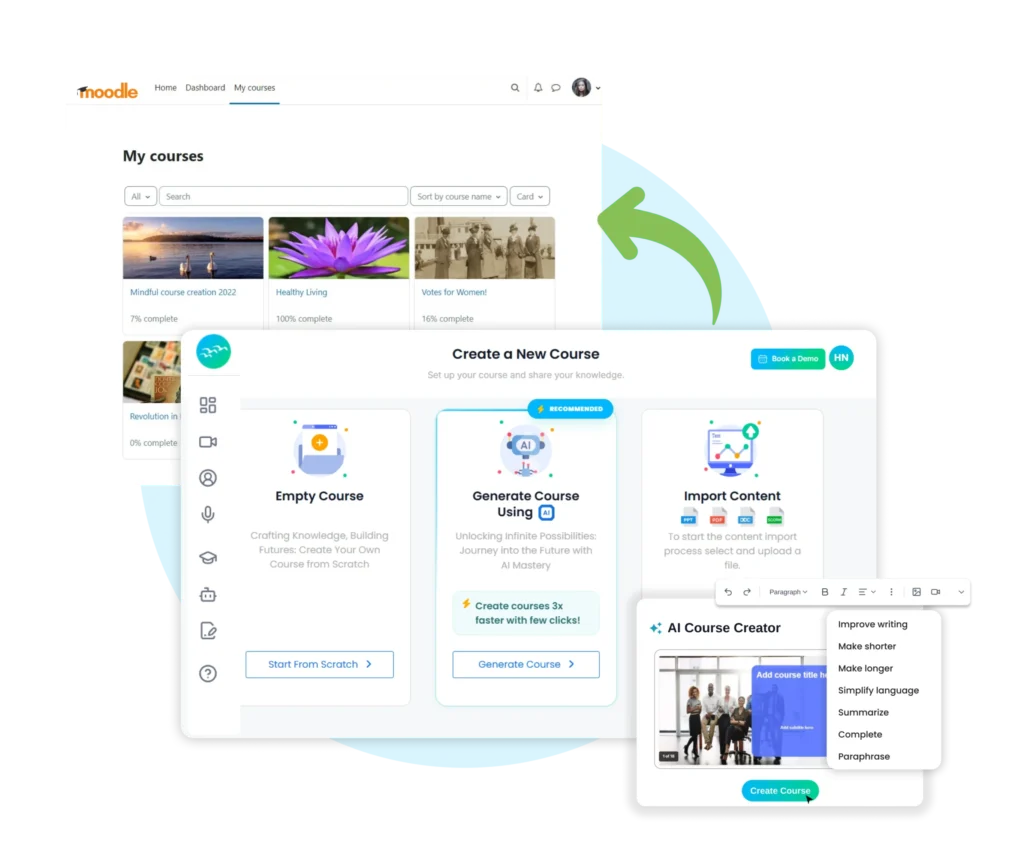
AI Course Builder
Generate full SCORM courses from a topic, brief, or PDF in under five minutes. Paradiso auto-builds storyboards, slides, voiceover and assessments your team edits in Moodle instead of starting from a blank page.
One-Click Plugin Install
Drop the plugin ZIP into Site Administration → Plugins → Install Plugins, click through the validation report, and Paradiso is live inside your Moodle. No FTP, no developer time, no infrastructure changes.
SCORM 1.2 & 2004 + Gradebook Sync
Every course published from Paradiso runs cleanly in the Moodle SCORM player. Quiz scores, completion status, and time-on-task flow into the Moodle gradebook automatically exactly as a native activity would.
70+ Language Voiceover & AI Video
Localize a single course into 140+ languages with AI voiceover in minutes. Add AI-generated video spokespersons for compliance, onboarding, or product training without a studio or a translator.
How It Works
Install the Paradiso Authoring Tool Plugin
in Your Moodle in 4 Steps
Download the Plugin
- Download the latest Paradiso Authoring Tool Plugin.
- Ensure the plugin folder is named authoring tool
Access Moodle Administration
- Log in to your Moodle site as a Site Administrator.
- Navigate to Site Administration → Plugins → Install Plugins
Upload the Plugin
- Click "Choose file" and select the plugin ZIP file.
- Confirm the plugin type is detected as Local plugin (local).
- Click "Install plugin from the ZIP file."
Complete the Installation
- Review the validation report.
- Click "Continue" to proceed and follow on-screen prompts.
- Once the upgrade process completes, click "Continue."
What You Get
What Paradiso Adds to Your Moodle
Everything below ships in the Paradiso Authoring Tool plugin ready to use the moment your install completes.
| Capability | What It Does Inside Moodle |
|---|---|
| AI Course Builder | ✓ Generate a 50+ slide SCORM course from a topic, brief, or PDF, then publish straight into your Moodle course library. |
| SCORM 1.2 & 2004 Publishing | ✓ One-click publish as SCORM 1.2 or SCORM 2004 (3rd / 4th Edition) — runs in the standard Moodle SCORM player. |
| AI Voiceover (70+ Languages) | ✓ Auto-generate professional voiceover for every slide and localize a single course into dozens of languages in minutes. |
| AI Video & Spokesperson | ✓ Generate AI presenter videos for compliance, onboarding, or product training — no studio, no recording required. |
| PowerPoint / PDF / Word Conversion | ✓ Drop your existing decks and documents in, get a fully interactive SCORM course out, ready to assign in Moodle. |
| Gradebook Sync | ✓ Quiz scores, completion status, and time-on-task flow into the Moodle gradebook through the native SCORM API. |
| Interactive Quizzes & Branching | ✓ Pre-built question types plus AI-generated assessments; every attempt is tracked back to the Moodle gradebook. |
| Embedded AI Tutor | ✓ Drop an AI tutor inside any Paradiso-built course so learners get instant answers without leaving the Moodle activity. |
| Multi-Language Translation | ✓ Translate course text, narration, and quizzes into 70+ languages — produce localized SCORM variants for each Moodle audience. |
use cases
What L&D Teams Build with Paradiso on Moodle
Six of the most common scenarios L&D, HR and CLO teams ship with the Paradiso authoring tool plugin for Moodle.
Compliance Training
Build POSH, GDPR, HIPAA, and code-of-conduct courses with built-in question banks, mandatory completion gates, and SCORM-tracked attempts that satisfy auditor reporting requirements straight from the Moodle gradebook.
Employee Onboarding
Convert your onboarding deck into an interactive 30-day learning path. Paradiso builds the SCORM module, you assign it as a Moodle course, and HR gets completion data automatically.
Sales Enablement
Generate product certification courses, role-plays, and refresher modules at the speed your product launches. AI voiceover in 140+ languages keeps regional sales teams aligned without translation backlogs.
Customer Training
Create engaging product training and certification courses for customers and partners. Deliver step-by-step learning paths, interactive modules, and assessments that improve product adoption and reduce support queries.
Leadership Development
Design structured leadership programs with scenario-based learning, assessments, and progress tracking. Help employees build critical soft skills, decision-making abilities, and managerial capabilities through guided learning journeys.
Compliance Refreshers
Automate recurring compliance training with scheduled refreshers, microlearning modules, and knowledge checks. Ensure employees stay up-to-date with policies while maintaining audit-ready records.
Get Started
Build Your First Paradiso Course Inside Moodle Today
Free plugin. Free starter plan. No credit card. Ready in under 30 minutes.
Security and Compliance
Enterprise-grade security, by compliance
Your training content and learner data, protected by default.
What Our Clients Say
Got Questions?
Frequently Asked Questions
Yes. Paradiso’s converters turn PowerPoint, PDF, Word, and MP4 files into SCORM-compatible courses in minutes. Once converted, you publish them straight to your Moodle course library through the plugin.