




THANK YOU
FOR YOUR INFORMATION
One of our expert will be in touch with you…



A training team once spent three months building a multi-module onboarding program using SCORM 2004 sequencing carefully configured prerequisites, branching paths, locked modules. They rolled it out across a client’s LMS platform and discovered the sequencing rules simply didn’t fire. The LMS could launch the course, but it quietly ignored the navigation logic, letting learners skip directly to modules they weren’t supposed to access yet. The team rebuilt the package in SCORM 1.2 and had it working in a day.
That story captures the SCORM 1.2 vs. SCORM 2004 debate better than any feature list. One version is predictable. The other is powerful when your LMS actually supports what it promises.
This guide breaks down the real differences between SCORM 1.2 and SCORM 2004: technical specs, all four 2004 editions, LMS compatibility realities, and a clear framework for choosing the right version for your training program.
SCORM (Sharable Content Object Reference Model) is a set of technical standards that lets eLearning courses communicate with Learning Management Systems (LMSs). A SCORM package is a ZIP file containing HTML content, a course manifest, and runtime scripts that tell the LMS how to launch the course and record learner data completion status, score, time spent, and more.
SCORM was developed by ADL (Advanced Distributed Learning) under the US Department of Defense, originally released as SCORM 1.1 in 2001. SCORM 1.2 followed that same year and quickly became the industry standard. SCORM 2004 was released in 2004 with four successive editions, the last of which was finalized in 2009. According to Rustici Software’s data, SCORM remains the most widely deployed eLearning standard globally, with millions of course launches happening every month and SCORM 1.2 still accounts for the majority of that volume.
For a deeper look at the standard itself, read our full guide: What Is SCORM? A Complete Guide to eLearning Interoperability.
The table below covers the most decision-relevant differences. The sections that follow explain what each one actually means in practice.
| Feature | SCORM 1.2 | SCORM 2004 (3rd / 4th Edition) |
|---|---|---|
| Status Tracking | Single lesson_status field |
Separate completion_status + success_status |
| Suspend Data Limit | 4,096 characters | ~64,000 characters |
| Interaction Data | Write-only (answers only) | Read-write (questions + answers) |
| Sequencing & Navigation | None (LMS-managed) | Advanced rules, prerequisites, branching |
| Multiple SCOs per Package | Limited | Yes, with rollup rules |
| Quiz Question Text in Reports | Not stored | Stored and reportable |
| LMS Compatibility | 90%+ of LMS platforms | Varies widely by LMS and edition |
| API Object Name | API (LMSInitialize / LMSFinish) |
API_1484_11 (Initialize / Finish) |
| Implementation Complexity | Low | Medium to High |
| Best For | Compliance, onboarding, standard training | Complex, multi-module, adaptive training |
In SCORM 1.2, the entire outcome of a learning event lives in a single lesson_status value. That field can be set to passed, failed, completed, incomplete, browsed, or not attempted — but only one value at a time. The problem: completion and success are different things, and SCORM 1.2 treats them as the same thing.
Picture a compliance course where the pass mark is 80%. A learner finishes every module but scores 65% on the final assessment. What does the LMS report? Depending on how the course is authored, it might report “failed” — hiding the fact that the learner actually finished the content. Or it might report “completed” — hiding the fact that they didn’t pass. Either way, you’re missing half the story.
SCORM 2004 fixes this by splitting the field into two: completion_status (completed/incomplete) and success_status (passed/failed). For compliance training and certification programs, that separation is genuinely useful — you can distinguish the people who need a re-sit from the people who simply haven’t opened the course yet.
When a learner exits a course before finishing, the LMS saves their progress in a suspend data field. That data can include quiz answers, branching decisions, module completion states, and anything else needed to restore exactly where they left off.
SCORM 1.2 caps that field at 4,096 characters. For a short linear compliance module, that’s usually enough. For a longer course with scenario-based branching, multiple assessments, or detailed interaction states, it isn’t — and when learners return to a course that hit the limit, some of their progress may simply be gone.
SCORM 2004 increased the limit to approximately 64,000 characters (from the 3rd edition onward), making resume behavior reliable even for complex, hour-long learning experiences. If your organization builds detailed simulation-based training or courses with many branching paths, the suspend data difference alone may justify the move to SCORM 2004.
In SCORM 1.2, interaction data is write-only. The course can record that a learner selected answer B on question 3, but it can’t later retrieve that fact. The practical consequence: if a learner returns to a previously answered question, the course has no way to know what they answered before.
SCORM 2004 makes interaction data read-write. The course can query the LMS for previous answers and respond accordingly – for example, preventing a learner from changing a submitted response on a second visit. SCORM 2004 also captures and stores the full text of quiz questions, not just the learner’s response. That makes reporting significantly richer: an L&D manager can see exactly which questions caused the most failures across the learner population, not just aggregate pass rates.
SCORM 2004 introduced a sequencing specification that lets course authors define rules for how learners move through content: prerequisite module locks, branching based on quiz results, mandatory completions before accessing the next section. Those rules are embedded in the SCORM package itself, so they travel with the course regardless of which LMS it’s deployed on.
In theory, this is a powerful capability. In practice, it’s the feature most likely to disappoint. Sequencing wasn’t fully usable until the 2nd edition of SCORM 2004, and it remains one of the most inconsistently implemented parts of the standard. Many LMSs claim SCORM 2004 support but don’t fully implement the sequencing specification — which is exactly how well-designed sequencing rules end up silently ignored in production.
This is the detail most comparison articles skip, but it’s the cause of a surprisingly common class of SCORM problems. SCORM 1.2 and SCORM 2004 use different JavaScript API object names to communicate with the LMS runtime.
SCORM 1.2 exposes the API as a global object literally called API, with function names like LMSInitialize() and LMSFinish(). SCORM 2004 exposes it as API_1484_11, with function names like Initialize() and Finish(). If a SCORM 2004 course is accidentally uploaded to an LMS expecting the SCORM 1.2 API object — or if an LMS configuration is set to the wrong version — the runtime communication fails entirely, and the course won’t track anything. That’s why version misconfiguration is one of the most common SCORM support issues L&D teams encounter.
SCORM 2004 wasn’t a single release – ADL published four editions between 2004 and 2009, each refining the standard. When your LMS says it supports “SCORM 2004,” it’s worth asking which edition, because the difference matters.
The original release of SCORM 2004. It introduced the concept of sequencing and the separation of completion and success status. However, sequencing was underspecified and had significant interoperability gaps, making it largely unusable in practice. Most organizations skipped directly to later editions. Very few modern LMSs reference 1st edition support specifically.
The 2nd edition focused on clarifying ambiguities from the 1st edition and fixing interoperability problems between course packages and LMS platforms. Sequencing received additional clarification, but implementation across LMS vendors was still uneven. The suspend data limit remained at 4,096 characters – the same as SCORM 1.2 – which limited the edition’s practical advantages for complex courses.
This is where SCORM 2004 became genuinely more capable than SCORM 1.2 for complex training. The suspend data limit increased dramatically from 4,096 characters to approximately 64,000 characters, making reliable course bookmarking possible for long, interactive learning experiences. The sequencing specification was further refined and better aligned between LMS vendors. Many modern LMS platforms that claim “SCORM 2004 support” are actually referring to 3rd edition conformance.
The most mature and stable version of the standard. The 4th edition refined sequencing by making navigation rules more consistent and predictable, resolving edge cases that had caused unpredictable behavior across different LMS implementations. It also improved interoperability for courses with complex prerequisites and branching paths. If your LMS supports it, SCORM 2004 4th Edition is the version to target it’s the most thoroughly tested and widely interoperable of the four.
Despite being over two decades old, SCORM 1.2 remains the dominant eLearning standard for a simple reason: it works reliably across nearly every LMS in existence. That predictability has real operational value, especially for organizations managing large content libraries across multiple platforms or client systems.
Choose SCORM 1.2 when:
The 4,096-character suspend data limit is the most practical constraint to check. If your courses are shorter than 30-45 minutes and don’t have complex branching, you’re unlikely to hit it. For longer or more interactive content, that limit becomes a genuine problem worth solving either by splitting the course into shorter SCOs or by moving to SCORM 2004.
SCORM 2004 is the right choice when your training requirements genuinely exceed what SCORM 1.2 can deliver – and when your LMS actually supports the features you need. That second condition is not a given, and it’s worth confirming before you invest in building courses that depend on it.
Choose SCORM 2004 when:
Most modern LMS platforms claim SCORM 2004 support, but that statement covers a wide range of actual implementation depth. An LMS can launch a SCORM 2004 course and record basic completion data while completely ignoring the sequencing rules the course author carefully defined. That’s technically SCORM 2004 “support” it just doesn’t include the features you actually wanted.
Before choosing SCORM 2004 for a production deployment, verify three things with your LMS vendor:
For organizations evaluating SCORM-compliant platforms, our guide to the best SCORM compliant LMS platforms covers how leading LMSs handle both standards in practice.
Some SCORM issues stem directly from version choice. The table below maps common problems to practical version guidance – though note that LMS configuration, authoring tool handling, and course structure all play a role alongside the version itself.
| Common Problem | Likely Cause | Version Recommendation |
|---|---|---|
| Learners lose progress when resuming a long course | SCORM 1.2’s 4,096-character suspend data limit exceeded | Move to SCORM 2004 3rd/4th Edition, or split the course into shorter SCOs |
| Reports can’t distinguish who passed from who just finished | SCORM 1.2’s single lesson_status combining completion and success |
SCORM 2004 with separate completion_status and success_status |
| Sequencing rules are ignored by the LMS | LMS doesn’t fully implement SCORM 2004 sequencing, or edition mismatch | Verify LMS conformance level; consider managing learning paths at the LMS level instead |
| Course behaves differently across client LMSs | Uneven SCORM 2004 implementation across platforms | SCORM 1.2 for maximum cross-LMS predictability |
| Reports only show final scores, not which questions failed | SCORM 1.2’s write-only interaction data | SCORM 2004 for question-level analytics |
| Course doesn’t track at all (API not found error) | Version mismatch — SCORM 2004 course uploaded to SCORM 1.2-configured LMS | Match the SCORM version in the authoring tool output to the LMS configuration |
| Migrating a large legacy course library is risky | SCORM 2004 may break existing content structure | Keep legacy content in SCORM 1.2; use SCORM 2004 only for new builds that need the features |
| Your Situation | Recommended Version |
|---|---|
| Short compliance, onboarding, or product training courses (under 45 min) | SCORM 1.2 |
| Distributing content across multiple client LMSs with unknown configurations | SCORM 1.2 |
| Large existing content library with straightforward tracking needs | SCORM 1.2 |
| Certification programs requiring auditable pass/fail separate from completion | SCORM 2004 |
| Long interactive courses where learners regularly pause and resume | SCORM 2004 |
| Multi-module programs with prerequisite paths you want embedded in the package | SCORM 2004 4th Ed. |
| Programs where question-level analytics inform content improvement | SCORM 2004 |
| Unsure whether your LMS fully implements SCORM 2004 sequencing | SCORM 1.2 (safer default until confirmed) |
Both SCORM versions share a fundamental constraint: they’re designed for content delivered inside an LMS via a web browser. That covers most corporate training programs, but it leaves out a growing slice of how learning actually happens – mobile apps, simulations, on-the-job performance support, social learning, and offline activities.
xAPI (also called Tin Can) was developed specifically to address that constraint. Unlike SCORM, xAPI sends learning statements to a Learning Record Store (LRS), not just to an LMS, which means it can capture any activity – not only course completions. It’s also not tied to a browser context, making it useful for tracking learning that happens in the flow of work.
That said, xAPI adoption for traditional LMS-delivered training is still lower than SCORM, partly because implementing an LRS alongside your LMS adds infrastructure complexity. Most organizations running standard compliance, onboarding, and skill development programs will still get better coverage and simpler operations from SCORM — particularly SCORM 1.2 — for their LMS-based content. xAPI makes the most sense as an addition to, rather than a replacement for, SCORM in those environments.
To understand where xAPI fits into your broader eLearning standards strategy, read our overview: xAPI vs. SCORM: The Evolution of eLearning Standards.
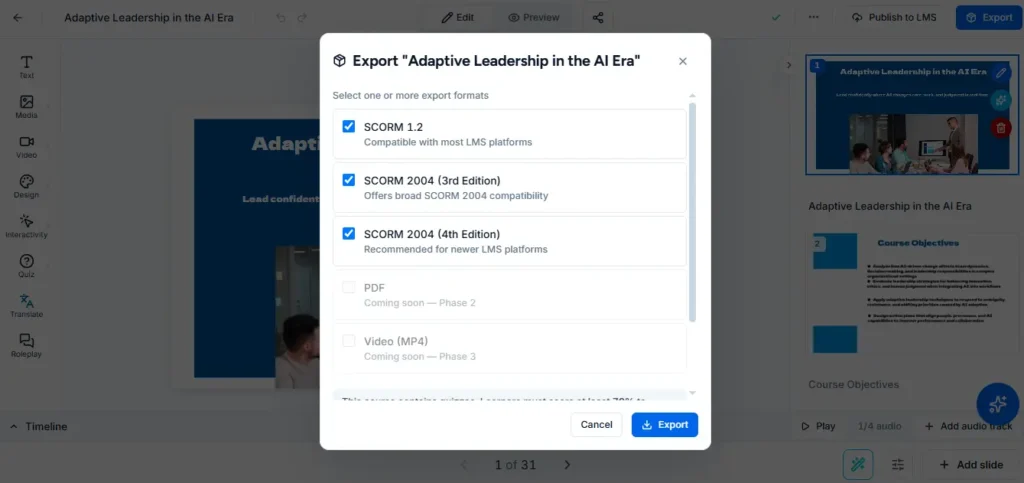
The right authoring tool makes the SCORM version decision a publishing option, not a technical project. Most professional tools today — Articulate Storyline, Adobe Captivate, iSpring, and others – support both SCORM 1.2 and SCORM 2004 4th Edition as output formats. The selection typically happens at the point of publishing, not during course development, which means you can build once and publish to either standard depending on the LMS you’re targeting.
Where tools differ is in how well they handle the edge cases: SCORM 1.2’s 4,096-character suspend data limit, API error handling when the LMS is slow to respond, and graceful fallbacks when a SCORM 2004 feature isn’t supported by the target LMS. A tool that silently produces a technically invalid SCORM package is more dangerous than one that flags the issue.
The Paradiso Authoring Tool exports to both SCORM 1.2 and SCORM 2004, and supports PPT, PDF, and video import so you can convert existing materials into standards-compliant courses without rebuilding from scratch. For teams deciding which authoring tool fits their authoring workflow and LMS, our full guide to choosing the right eLearning authoring tool covers the evaluation criteria worth prioritizing.
Export SCORM 1.2 or SCORM 2004 – Free, No Credit Card Required
Build courses from scratch, upload PPT or PDF files, or use AI — then publish to either SCORM version in minutes with the Paradiso Authoring Tool.
The honest answer is that SCORM 1.2 remains the right default for most training programs. Not because it’s better on paper – SCORM 2004 genuinely is more capable – but because its behavior is more predictable across the wide range of LMS platforms your content will encounter in the real world.
Use SCORM 2004 when your training program has specific requirements that SCORM 1.2 cannot meet: separate pass/fail and completion tracking, reliable bookmarking for long courses, or question-level analytics. When you make that choice, target SCORM 2004 4th Edition, verify your LMS’s actual conformance level before deployment, and test with a real package before releasing to learners.
And if you’re building for SCORM either way, the authoring tool you choose matters as much as the version. A tool that handles both standards cleanly means your team focuses on designing effective learning – not debugging export settings.
→ Find the best SCORM compliant LMS for your training program
→ Try the Paradiso Authoring Tool free — export to SCORM 1.2 or 2004
