




Quick Answer
How do you create a course using AI?
To create an online eLearning course with AI: open an AI course creation tool like Paradiso Authoring Tool, enter your topic as a prompt (or upload an existing PowerPoint, PDF, or document), let the AI generate a structured course with modules, slides, and quizzes, then customize, add voiceover, preview, and export as a SCORM package for your LMS. What used to take 30-40 hours of manual authoring can be done in an afternoon. The output is a complete, standards-compliant course your Learning Management System can import and track.
- Fastest free method: Type a topic prompt into Paradiso Authoring Tool → AI generates a full course → export SCORM
- From existing content: Upload your PPT, PDF, or WORD→ AI converts and enriches it → export SCORM
- Time savings: AI cuts course production from ~40 hours to 3-5 hours for a typical 5-module course
Watch the full walkthrough – from prompt to published SCORM course:
Why People Are Creating Courses with AI in 2026
The training demand inside most organizations has outpaced the team that builds it. The Josh Bersin Company’s 2026 research found that 74% of companies say they can’t keep pace with the demand for new skills across their workforce. Content needs are growing compliance updates, onboarding programs, product launches, safety refreshers and the L&D team size hasn’t grown with them.
AI course creation doesn’t solve that gap completely. But it changes the math dramatically. A 5-module compliance course that took a senior instructional designer 30-40 hours of manual authoring outlining, writing, slide design, quiz creation, voiceover scripting can now be produced in 3-5 hours. Not because the AI replaces the designer’s judgment, but because it handles the mechanical production that consumed most of the time.
This guide shows you the complete process from a blank screen to a finished SCORM course your LMS can track using AI. Every step includes what to expect, where AI helps, and where your expertise still matters.
What You Need Before You Start
The barrier to entry is genuinely low. You need three things:
1. A topic you can explain clearly. This can be a professional skill, a compliance topic, an onboarding program, a product walkthrough, or an academic subject. If you can describe it in a paragraph, AI can generate a course structure from it.
2. Existing materials (optional, not required). If you already have training content in another format – PowerPoint slides, a PDF handbook, Word documents – you can upload those instead of starting from scratch. The AI will transform them into a structured course with navigation, quizzes, and tracking.
3. A free AI course creation tool. This guide uses Paradiso Authoring Tool because it’s the only free platform that handles all three starting points – text prompt, file upload, and template – and exports both SCORM 1.2 and SCORM 2004. No credit card, no trial expiry.
That’s it. No instructional design degree, no coding skills, no video production equipment.
100% Free · No Credit Card · No Trial Expiry
Follow along: create your first AI course in the next 30 minutes
Sign up for free, then follow the step-by-step walkthrough below. By the end of this guide, you’ll have a complete, SCORM-ready course.
Create Free Account →
Free plan, no trial expiry
Step 1: Choose Your Starting Point
AI course creation begins with one decision: are you building from scratch, or do you already have content to work with?
When you open Paradiso Authoring Tool, you see three options:
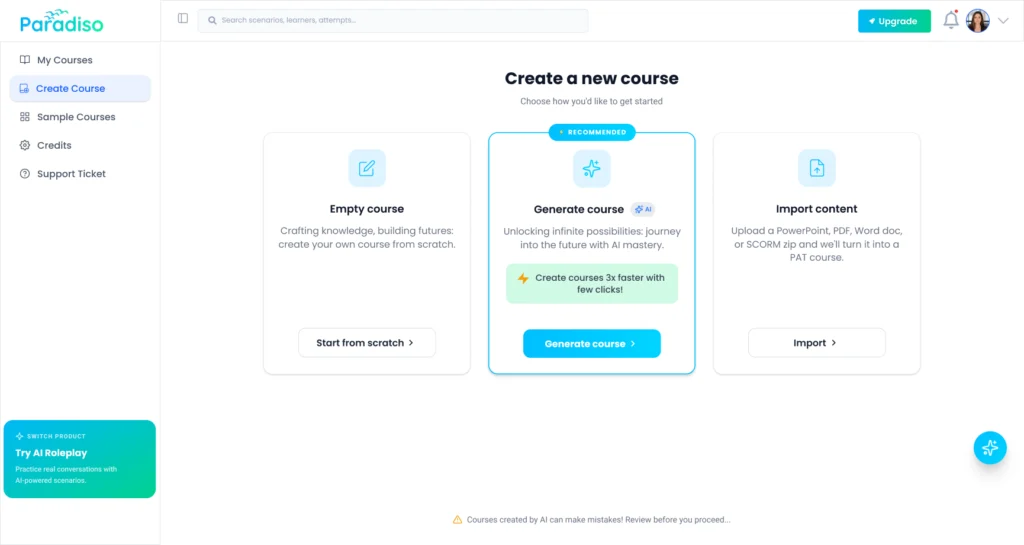
Option A: Create from a text prompt. Describe your course topic in plain language. You can be as brief as “HIPAA compliance training for healthcare workers” or as detailed as a full outline with learning objectives. The AI uses your prompt as the foundation for the entire course structure.
Option B: Upload existing content. Drop in a PowerPoint, PDF or Word document. The AI doesn’t just wrap the file – it reads the content, structures it into modules and slides, and generates quizzes based on the material. Your existing investment in content creation isn’t lost; it’s accelerated.
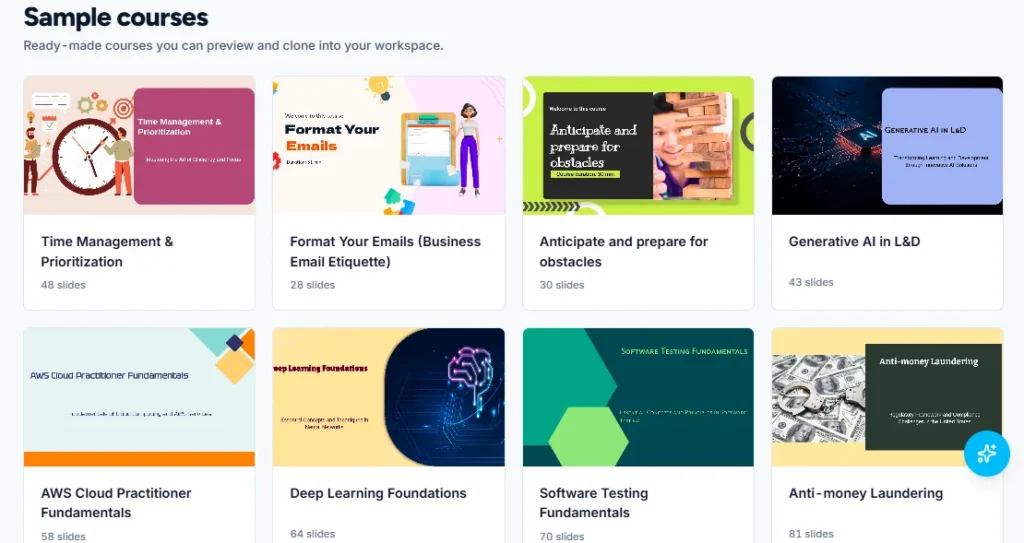
Option C: Start from a template. Choose from 50+ ready-made templates built for specific training scenarios – cybersecurity awareness, HIPAA basics, employee onboarding, anti-harassment, safety training, product knowledge. Customize the template rather than building from zero.
Practical advice: If this is your first course, start with a text prompt for a topic you know well. You’ll see the AI’s capabilities most clearly when you can judge whether the output matches your expertise. If you have existing slides that are “good but not LMS-ready,” upload them – that conversion path is where AI saves the most time versus manual work.
Step 2: Let the AI Generate Your Course Structure
This is where the time savings become tangible. After you provide your topic prompt, the AI generates a complete course structure in under two minutes.
What happens behind the scenes: the AI analyzes your input, identifies the key learning concepts, determines an appropriate sequence, creates module and lesson divisions, and drafts the initial content for each slide. If you uploaded a document, it extracts the core information and reorganizes it into a pedagogically sound course flow.
What you see: a structured outline with modules, lessons within each module, and draft content for each slide.
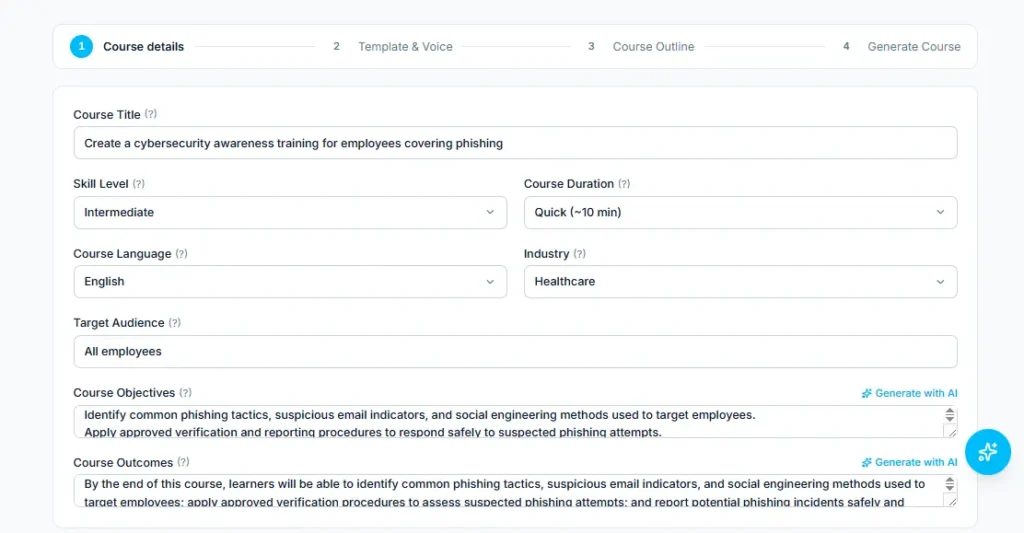
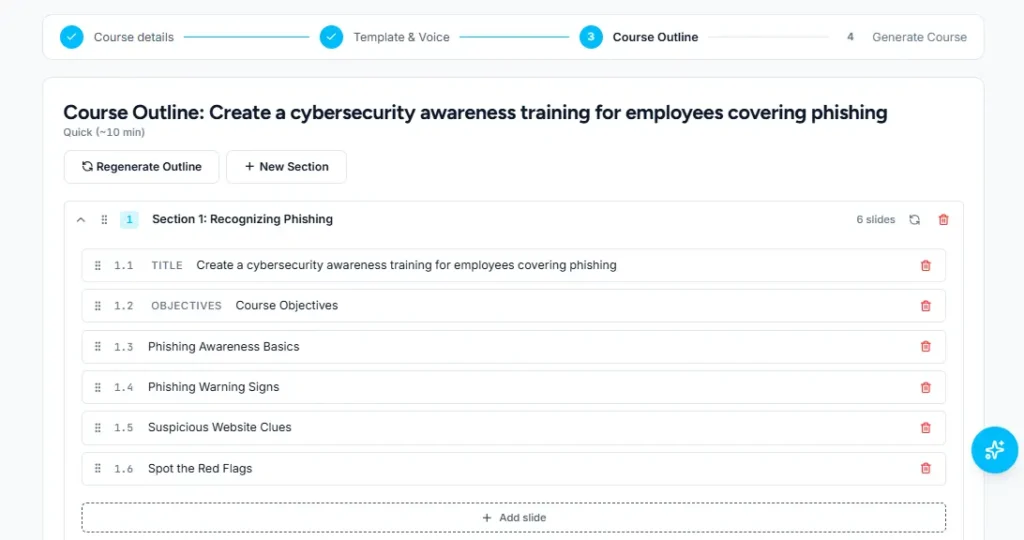
A realistic example: if you prompt “Create a cybersecurity awareness training for employees covering phishing, password security, social engineering, and incident reporting,” the AI might generate:
- Module 1: Understanding Cybersecurity Threats (3-4 slides covering the current threat landscape)
- Module 2: Recognizing Phishing Attacks (4-5 slides with examples of real phishing patterns)
- Module 3: Password Security and Multi-Factor Authentication (3-4 slides)
- Module 4: Social Engineering Tactics (3-4 slides covering pretexting, baiting, tailgating)
- Module 5: What to Do When Something Goes Wrong (3 slides covering incident reporting procedures)
- Knowledge Check: 10-question assessment covering all modules
What to check at this stage: Does the structure cover the right topics? Is anything critical missing? Is the sequence logical does each module build on the previous one? This is the point where your expertise matters most. The AI produces a strong first draft, but you’re the one who knows whether Module 3 should come before Module 2 for your specific audience.
Step 3: Customize and Refine the Content
The AI-generated first draft is a starting point, not a finished product. This step is where you transform a generic course into something that reflects your organization’s voice, policies, and real-world context.
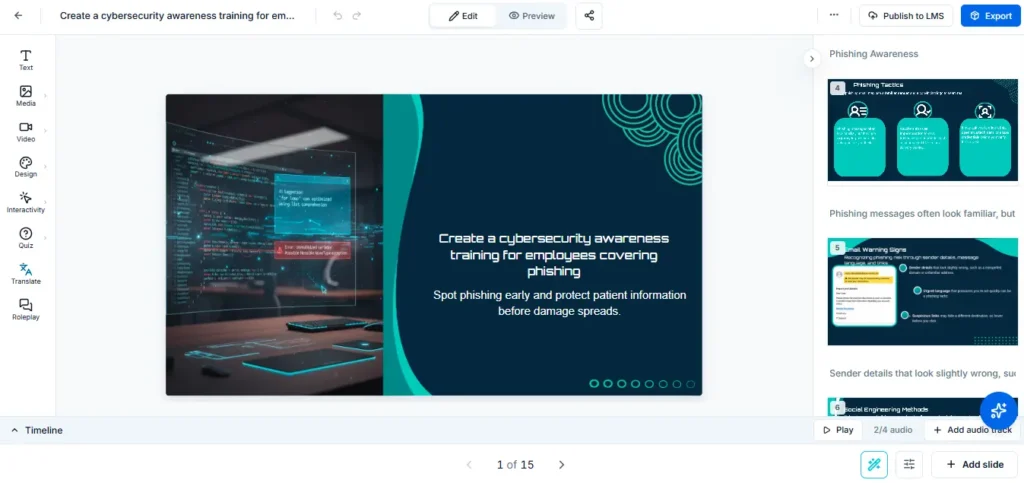
What to customize:
- Company-specific context. Replace generic examples with your organization’s real scenarios. “An employee receives a suspicious email” becomes “Last quarter, our finance team received three phishing emails that looked exactly like vendor invoices.”
- Policy references. For compliance training especially, link to your actual policies. AI generates good general content, but your company’s specific harassment reporting procedure or data breach protocol needs to come from your policy documents.
- Tone and complexity. Adjust the reading level for your audience. Training for frontline retail workers reads differently from training for senior engineers. Simplify or deepen sections where the AI misjudged the audience.
- Visual layout. Rearrange slides, change layouts, adjust the balance between text and visual elements. AI tends to be text-heavy by default – your job is to trim and visualize where possible.
A useful framework: Spend 60% of your customization time on the first and last modules. The opening sets expectations and engagement; the closing determines what learners remember. The middle modules typically need lighter editing – correcting facts, adjusting examples, trimming redundancy.
Time estimate: For a 5-module course, expect 1-2 hours of customization. Compare that to 15-20 hours of writing the same content from scratch.
Step 4: Add Quizzes and Assessments
Assessment is where most AI-generated courses fall short – and where your input matters most. The AI can generate quiz questions, but they need your review for accuracy, appropriate difficulty, and alignment with actual learning objectives.
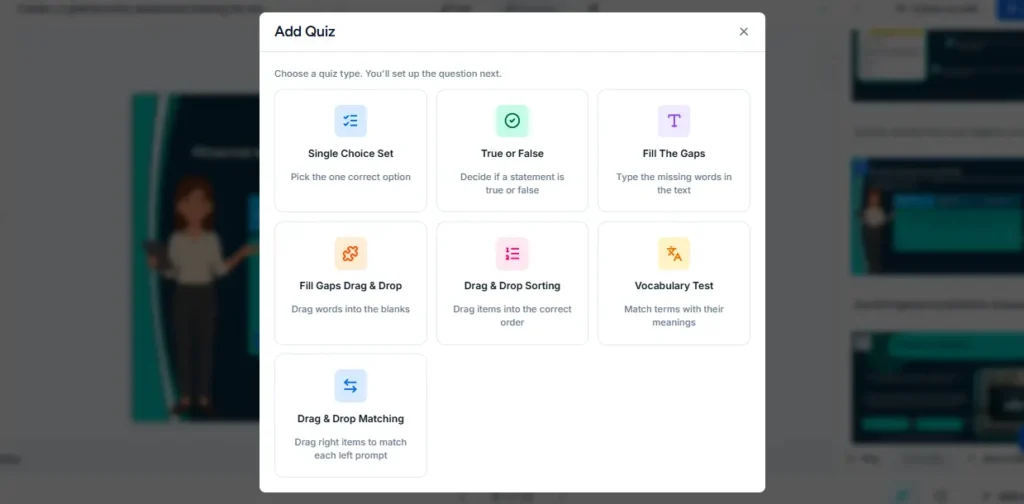
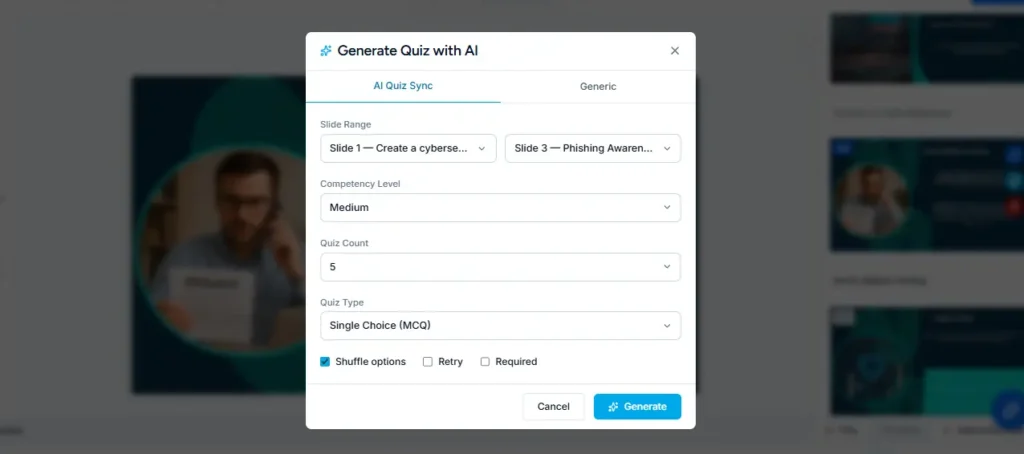
Paradiso’s AI quiz builder generates questions directly from your course content. You can choose question types:
- Multiple choice (most common for compliance and knowledge checks)
- True/false (quick reinforcement)
- Matching (connecting concepts to definitions)
- Fill-in-the-blank (recall-based testing)
What to watch for in AI-generated quizzes:
- Plausible distractors. The wrong answers should be believable. If three of four options are obviously wrong, the question doesn’t actually test understanding.
- Scenario-based questions. Add at least 2-3 scenario questions per module: “An employee receives an email from ‘IT Support’ asking them to click a link to reset their password. What should they do?” These test application, not just recall.
- Passing thresholds. For compliance training, your organization likely has a minimum passing score (typically 70-80%). Set this in the SCORM settings so the LMS records pass/fail correctly.
For compliance-heavy environments — healthcare, financial services, government — every quiz question must be validated against the actual regulatory standard or procedure it’s meant to assess. AI-generated questions are a strong starting point, but they require verification by someone who knows the specific compliance requirements.
Step 5: Add Voiceover and Media
Text-only courses have measurably lower completion rates than courses with audio narration and visual variety. Paradiso’s AI voiceover generates natural-sounding narration from your slide text in over 70 languages – no recording studio, no microphone, no editing.
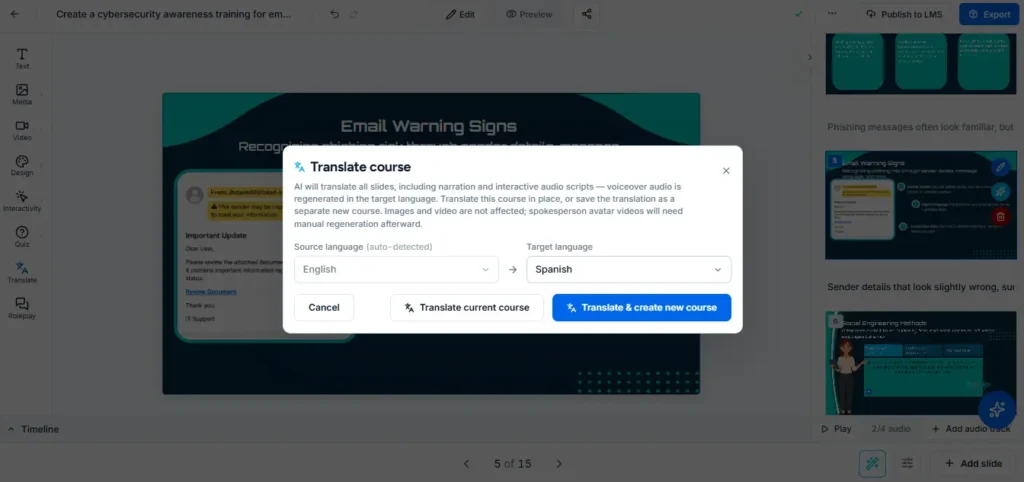
How to use AI voiceover effectively:
- Narrate, don’t read. The best approach: write a concise version of each slide’s key points in the narration field, rather than having the AI read the full slide text verbatim. Learners read the slides and hear a complementary explanation – not the same words twice.
- Choose the right voice. Match the voice and tone to your audience and subject matter. A warm, conversational voice for onboarding. A clear, authoritative voice for compliance. Preview multiple options before committing.
- Multilingual training. If your workforce spans multiple languages, generate voiceover in each language from the same source text. One course, multiple language versions, without recording anything.
Beyond voiceover, consider adding:
- Images and diagrams that illustrate concepts visually (the AI can generate images, or you can upload your own)
- Screen recordings for software training or process walkthroughs
- Company branding – your logo, color scheme, and fonts – so the course looks like it came from your organization, not from a generic template
Step 6: Preview and Test
Before exporting, preview the entire course as a learner would experience it. This is the step most first-time course creators skip – and the step that prevents the most common embarrassments.
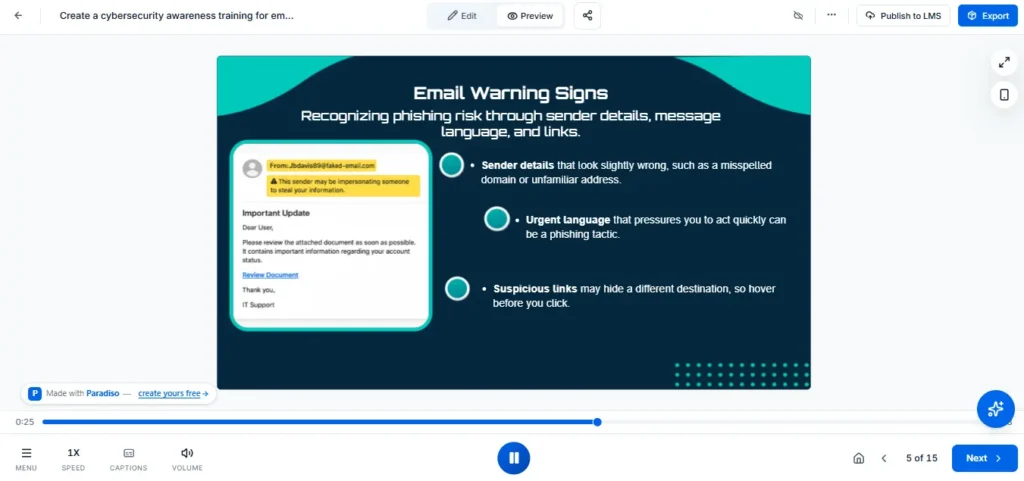
Preview checklist:
- Navigation: Can you move forward and backward through all slides? Does the progress bar reflect actual progress?
- Quizzes: Do all questions display correctly? Are the correct answers actually correct? Submit wrong answers intentionally — does the feedback make sense?
- Voiceover: Does the audio sync with each slide’s content? Are there any pronunciation issues with industry-specific terms?
- Mobile responsiveness: Preview on a phone-sized screen. Do slides still read well? Are interactive elements tappable?
- Completion logic: Finish the entire course in preview. Does the completion status register? If there’s a passing score threshold, does it work?
Time estimate: 30-45 minutes for a thorough preview of a 5-module course. This is genuinely the most important quality step.
Step 7: Export as SCORM and Upload to Your LMS
The final step: packaging your course as a SCORM file and uploading it to your Learning Management System.

SCORM 1.2 vs SCORM 2004 – which should you choose?
Choose SCORM 1.2 if you want maximum compatibility. Virtually every LMS on the market supports it – Moodle, Paradiso LMS, Cornerstone, SAP SuccessFactors, TalentLMS, Docebo. It tracks completion, score, time spent, and pass/fail.
Choose SCORM 2004 if your course uses advanced sequencing – conditional navigation where learners must pass Module 1 before Module 2 unlocks, or branching paths that adapt based on quiz performance. Fewer LMS platforms support 2004 perfectly, so verify compatibility with your LMS first.
When unsure: go with SCORM 1.2. It works everywhere.
How to upload to your LMS:
- Click “Export” in Paradiso Authoring Tool and select SCORM 1.2 or SCORM 2004
- Download the .zip file – don’t unzip it
- Log into your LMS as an admin or course creator
- Navigate to “Add Course” or “Upload Content”
- Upload the .zip file directly
- Your LMS reads the SCORM manifest and registers the course automatically
- Set enrollment rules, passing score, and assignment dates
- Publish to learners
From prompt to published course in your LMS – that’s the complete workflow.
Already Have Training Content? Convert It Instead of Rebuilding
Not every course needs to be built from scratch. If your organization has existing training materials in other formats, converting them to SCORM-ready eLearning courses is faster and preserves the investment you’ve already made in content development.
PowerPoint to SCORM. Most corporate training still lives in PowerPoint. Instead of rebuilding 50 slides from scratch, upload them directly – the AI adds navigation, completion tracking, and optional quizzes to your existing slides. The result is a proper SCORM package, not just a deck.
→ Convert your PowerPoint to SCORM free
PDF to SCORM. Policy documents, handbooks, SOPs, and reference guides can become trackable SCORM courses. Upload your PDF, add a knowledge check at the end, and export. Your LMS now tracks who read the document and whether they passed the assessment.
→ Convert your PDF to SCORM free
Word document to SCORM. Training guides, procedures, and instructional documents can go straight from Word to a SCORM-packaged course.
→ Convert your Word document to SCORM free
Common Use Cases: What People Are Building
The type of course you’re creating shapes which AI features matter most. Here’s what we see most often:
Compliance training – HIPAA, cybersecurity awareness, anti-harassment, workplace safety. The highest-volume use case for AI course creation. These courses need to exist, need to be completed, and need to be documented speed matters more than creative design. AI handles the bulk production; your compliance team validates accuracy. Paradiso’s template library includes compliance-ready templates that can be customized rather than built from zero.
Employee onboarding – company overview, role-specific training, systems access, culture and values. Onboarding courses change frequently as policies and tools evolve. AI makes it practical to update and republish quarterly instead of treating onboarding as a once-and-done production.
Product and sales training – new product launches, feature updates, competitive positioning. These courses have short shelf lives – a product update every quarter means the training needs to update too. AI makes the rebuild fast enough that you actually do it instead of letting outdated training persist.
Customer education – how-to guides, feature walkthroughs, best practices. External-facing courses where production quality matters. AI generates the structure and content; your team polishes the presentation for a customer audience.
What AI Can and Can’t Do in Course Creation (The Honest Version)
The marketing pitch across the industry – “create a course in 10 minutes” – doesn’t reflect what actually happens in practice. Here’s the accurate picture:
What AI does well:
- Generates course structure from a topic or document in under 2 minutes
- Writes first-draft content for each slide – typically 70-80% usable
- Creates quiz questions from course content automatically
- Generates voiceover narration in 70+ languages
- Converts existing files (PPT, PDF, Word) into structured courses
- Produces a SCORM-compliant package ready for LMS delivery
What AI doesn’t do (and where you still need human judgment):
- Validate factual accuracy for specialized domains – especially compliance, medical, legal content
- Provide real organizational examples, case studies, or internal references
- Judge the appropriate depth and complexity for a specific audience
- Create genuinely challenging scenario-based assessments (it can draft them, but you need to refine)
- Replace Subject Matter Expert review for high-stakes training
The realistic time savings: A 5-module course that previously took 30-40 hours of manual production can be completed in 3-5 hours about 85% faster. The AI handles the 80% of work that’s mechanical (structure, drafting, formatting, packaging). You handle the 20% that requires judgment (accuracy, context, assessment quality).
100% Free · SCORM 1.2 & 2004 · No Credit Card
Ready to build your first AI-generated course?
Follow the 7 steps above inside Paradiso Authoring Tool. Free plan includes AI generation, voiceover, quizzes, templates, and SCORM export. No trial expiry.
Start Creating Free →
Free plan, no trial expiry
Frequently Asked Questions
How long does it take to create an online course with AI?
A typical 5-module course takes 3-5 hours from start to finished SCORM package when using AI. The AI generates the structure and first-draft content in under 2 minutes. Most of your time goes into customizing content for your specific audience (1-2 hours), refining quizzes (30-60 minutes), adding voiceover (15-30 minutes), and reviewing the final course (30-45 minutes). Compare that to 30-40 hours for the same course built entirely by hand.
Can I create a course with AI for free?
Yes. Paradiso Authoring Tool offers AI course generation, SCORM 1.2 and 2004 export, voiceover, quiz building, and 100+ templates on a forever-free plan – no credit card, no trial expiry. The free plan includes 35 AI text credits per month, which is enough to generate approximately 5-7 complete course structures. Other tools like Canva and Coursebox also offer limited AI course features, but Paradiso is the only free option with full SCORM export.
Is AI-generated course content accurate enough for compliance training?
AI-generated content is a strong starting point for compliance training – it handles structure, formatting, and general knowledge well. However, for regulated environments like healthcare (HIPAA), financial services, or government, every piece of content and every quiz question must be reviewed and validated by a Subject Matter Expert against the actual regulatory requirements. Use AI to generate 80% of the mechanical work, then invest your expert review time in the 20% that requires specialized accuracy.
What formats can I export an AI-generated course in?
Paradiso Authoring Tool exports courses as SCORM 1.2 and SCORM 2004 packages – the two most widely supported eLearning standards. SCORM 1.2 works with virtually every LMS (Moodle, Cornerstone, SAP SuccessFactors, Paradiso LMS, Docebo, TalentLMS, and hundreds more). SCORM 2004 adds advanced sequencing and branching capabilities. Some tools also support xAPI and HTML5 exports.
Can I convert my existing PowerPoint into an AI-enhanced course?
Yes. Upload your PowerPoint to Paradiso Authoring Tool and the AI converts it into a structured course with navigation, completion tracking, and optional AI-generated quizzes layered on top of your existing slides. The converted course exports as a SCORM package ready for any LMS. You can also convert PDFs and Word documents the same way. See: PPT to SCORM converter.
What’s the difference between creating a course from a prompt vs uploading a document?
From a prompt: You describe the topic and the AI generates the entire course structure and content from its knowledge base. Best when you’re creating something new and don’t have existing materials. The AI’s output depends on how specific your prompt is – more detail produces better results.
From an uploaded document: The AI reads your file (PPT, PDF or Word), extracts the key information, and restructures it into a proper course format with modules, slides, quizzes, and navigation. Best when you already have content that’s “good but not course-shaped” – training decks, policy documents, recorded sessions. The AI preserves your content and adds the eLearning structure around it.
How does AI course creation compare to tools like Articulate 360 or Adobe Captivate?
Articulate 360 ($1,299/year) and Adobe Captivate ($33/month) are powerful authoring tools — but they don’t build courses for you. You still design every slide, write every word, and manually build every interaction. AI course creation tools like Paradiso Authoring Tool generate the first draft of the entire course automatically, then let you refine it. The trade-off: Articulate and Captivate offer deeper customization and more granular interaction design; AI tools offer dramatically faster production time. For standard training content (compliance, onboarding, product training), AI production is typically sufficient. For highly interactive simulations or branching scenarios, the premium tools may be worth the cost. For a deeper comparison, see the full Best AI course creators comparison guide.
Conclusion: From Idea to SCORM Course in an Afternoon
Creating an online course with AI follows seven clear steps: choose your starting point (prompt, file, or template), generate the structure, customize the content, build assessments, add voiceover and media, preview and test, then export as SCORM for your LMS. The entire workflow takes 3-5 hours for a typical 5-module course – a fraction of what manual authoring requires.
The tools have reached the point where the question is no longer “can AI create a course?” – it’s “how much of the production should AI handle?” For most organizations, the answer is: let AI handle the mechanical 80% (structure, drafting, formatting, packaging) and invest your expertise in the 20% that determines whether the training actually works (accuracy, context, assessment quality, learner experience).
100% Free · No Credit Card · No Trial Expiry
Create Your First AI Course – Free
Paradiso Authoring Tool turns a text prompt, PowerPoint, or PDF into a complete SCORM-ready course with AI. Free plan, no trial expiry, no credit card.
Start Creating Free →
Free plan, no trial expiry



