


With organizations expanding, there arises a need when all their allies meet in a single, centralized, and cost-effective middlemost i.e. a meeting. It’s in that one momentous meeting, that routine business activities bear fruit. And what better way to conduct meetings online than Zoom LMS. Given the super colossal sizes of the organizations, getting people to conglomerate at a given place and given point of time has become next to impossible. Hence, the need for a web meeting solution or so to say, the current Zoom LMS integration! This integration proves to be of great use for multinationals who have their employees scattered around the globe. The best part of the Zoom LMS union is that it lets you record live meetings to view it later.
Zoom LMS Integration
Paradiso LMS and Zoom work together as one seamless package. Our platform – part of the broader Paradiso AI Learning Ecosystem including Paradiso LMS (Enterprise & Education AI LMS), Paradiso Authoring Tool, Paradiso AI Roleplay, and Paradiso LXP – makes it simple to deliver engaging online training. With Zoom coming into the mix, you get unified cloud video conferencing, simple online meetings, group messaging, and a software-based conference room solution into one user-friendly platform. Zoom LMS offers the best video, audio, and screen-sharing experience across Windows, Mac, iOS, Android, Zoom Rooms, and other room systems.
Beyond simple web links, Paradiso LMS supports embedded Zoom SDK integration. This means learners and instructors can launch and participate in live video sessions directly inside the Paradiso interface without needing to download, open, or switch to an external Zoom application. While Zoom is a primary virtual classroom tool, Paradiso’s VILT engine also supports full two-way integrations with Microsoft Teams, Cisco WebEx, GoToMeeting/GoToWebinar, and Adobe Connect.
Full Zoom Management Within Paradiso LMS
- Paradiso LMS Zoom connector enables single sign-on to Zoom directly from Paradiso LMS
- Scheduling a single session to an entire batch of learners in mere clicks directly from Paradiso LMS
- Zoom sessions get recorded and are available for further download or automated side-loading in the LMS.
- Secure account management utilizing state-of-the-art encryption that makes sure that LMS Zoom account information is always stored securely.
- Automated Zoom host provisioning and deactivation.
Stop Managing Zoom Classes and Training Records Separately
See how Paradiso LMS connects Zoom scheduling, attendance tracking, and session recordings in one learning platform.
Additional Solutions That Complement Zoom LMS Integration
- Zoom LDAP and Active Directory integration, enabling secure Single Sign-On, Zoom host provisioning, and host deactivation.
- Out-of-the-box SSO support for Active Directory, Azure AD, SAML 2.0, OAuth, Okta, OneLogin, Auth0, Google Workspace, and Clever.
- Automated side-loading of recorded Zoom sessions in Paradiso LMS, providing a cost-effective storage solution.
- Two-way Webhooks (Send/Receive), RESTful, JSON, and SOAP APIs, alongside no-code automation integrations with Zapier, Workato, MuleSoft, and n8n.
- Flexible deployment options: Multi-tenant SaaS, Single-tenant Private Cloud, or On-Premise hosted on AWS and DigitalOcean global data centers (US, UK, EU, India, Singapore, Australia), backed by a 99.3% Uptime SLA.
- Efficient and secure user management protecting user credentials through ISO 27001, SOC 2 Type I & II, GDPR, CCPA, and HIPAA-compliant architectures.
Why Is Zoom LMS Integration Important?
The Zoom LMS integration can take your training programs to the next level. Not only do you get a captivating and dynamic learning experience, but this experience can be broadcasted to anywhere in the world where people may need it. It provides a rich and wholesome training experience for all those involved right from partners and employees to customers and students.
Also, the LMS Zoom connector allows you to create an environment in which instructors and learners collaborate effortlessly on both online and offline instances.
When it comes to hosting a webinar, conference, or virtual classroom, many users opt for Zoom Meetings. But have you ever thought of offering a lecture, presentation, or conference directly from your LMS instance? Well, here at Paradiso Solutions we are able to do that. By combining both services we can enable you to create an environment where Zoom meetings and Paradiso LMS hold hands to bring the best service.
In addition, the Zoom LMS integration gives to your global employees an opportunity to meet each other in real time over the web-based portal. Pairing these sessions with an ai note taker for Zoom also gives teams a written record of what was covered. In these meetings, not only the attendees can see or hear each other, but also the flow of content between them becomes possible.
5 Key Benefits of Zoom LMS Integration
Integrating Zoom with your LMS goes beyond simply launching virtual meetings. A well-structured Zoom LMS integration enhances both learning delivery and administrative efficiency.
1. Single Sign-On (SSO) Access
Users access Zoom sessions directly from the LMS without separate logins. Support for SAML, OAuth, Okta, Azure AD, and Active Directory eliminates login friction.
2. Automated Scheduling & Calendar Sync
Instructors schedule live sessions within course modules without manual meeting creation. Enrolled learners automatically receive email notifications and two-way calendar invites (Google Calendar, Outlook) so live sessions are never missed.
3. In-Session Engagement & Attendance Tracking
Session attendance data is captured automatically alongside granular participation metrics (talk-time, camera activity, in-session polls, and quizzes) that sync directly with learner progress reports and gradebooks.
4. Recording Management
Recorded Zoom sessions are automatically saved and side-loaded into the course library, allowing learners to revisit video playback anytime.
5. Secure Host Management & Cost Optimization
Administrators manage Zoom host provisioning and permissions centrally without sharing credentials. Centralizing host allocation avoids purchasing individual Zoom licenses for every instructor, optimizing live training software overhead.
How to Connect Zoom to Paradiso LMS (Admin Setup)
Before instructors can schedule meetings inside courses, an administrator connects the two systems using Zoom’s secure Server-to-Server OAuth setup:
1. Create the Zoom App
Log into the Zoom App Marketplace, create a Server-to-Server OAuth app, and assign permissions for meetings, recordings, and user accounts.
2. Copy Credentials
Grab your Account ID, Client ID, and Client Secret from your Zoom developer dashboard.
3. Link Platforms
Paste these credentials into the Paradiso LMS Integration panel and click Verify Connection.
Once activated, instructors can instantly schedule classes directly from their course dashboards.
How to Set Up a Meeting from Your Zoom LMS Integration?
To schedule a Zoom Meeting activity in LMS you can follow the next steps:
- Go to any existing course/ create a new course and click on “Add Content”.
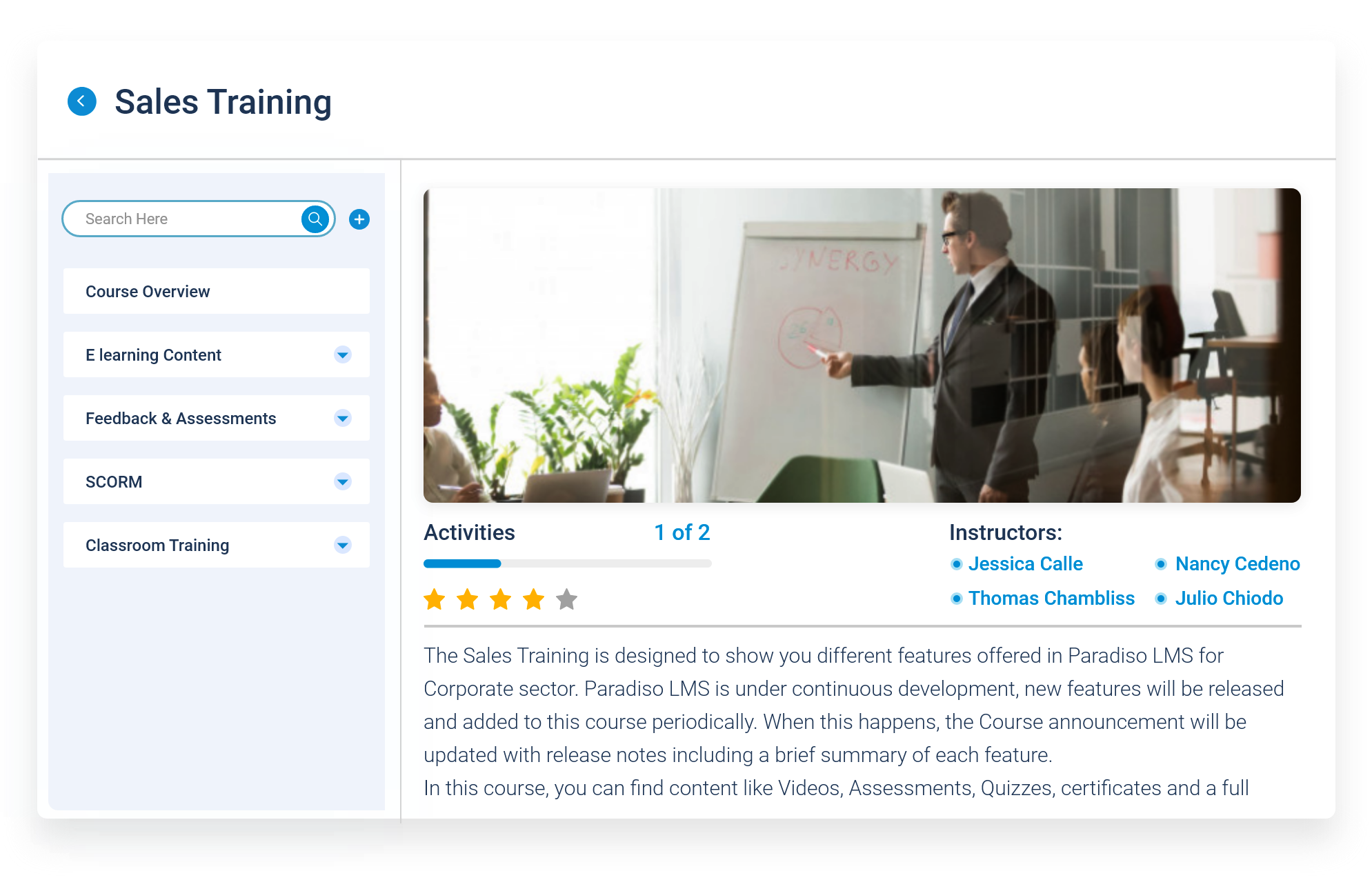
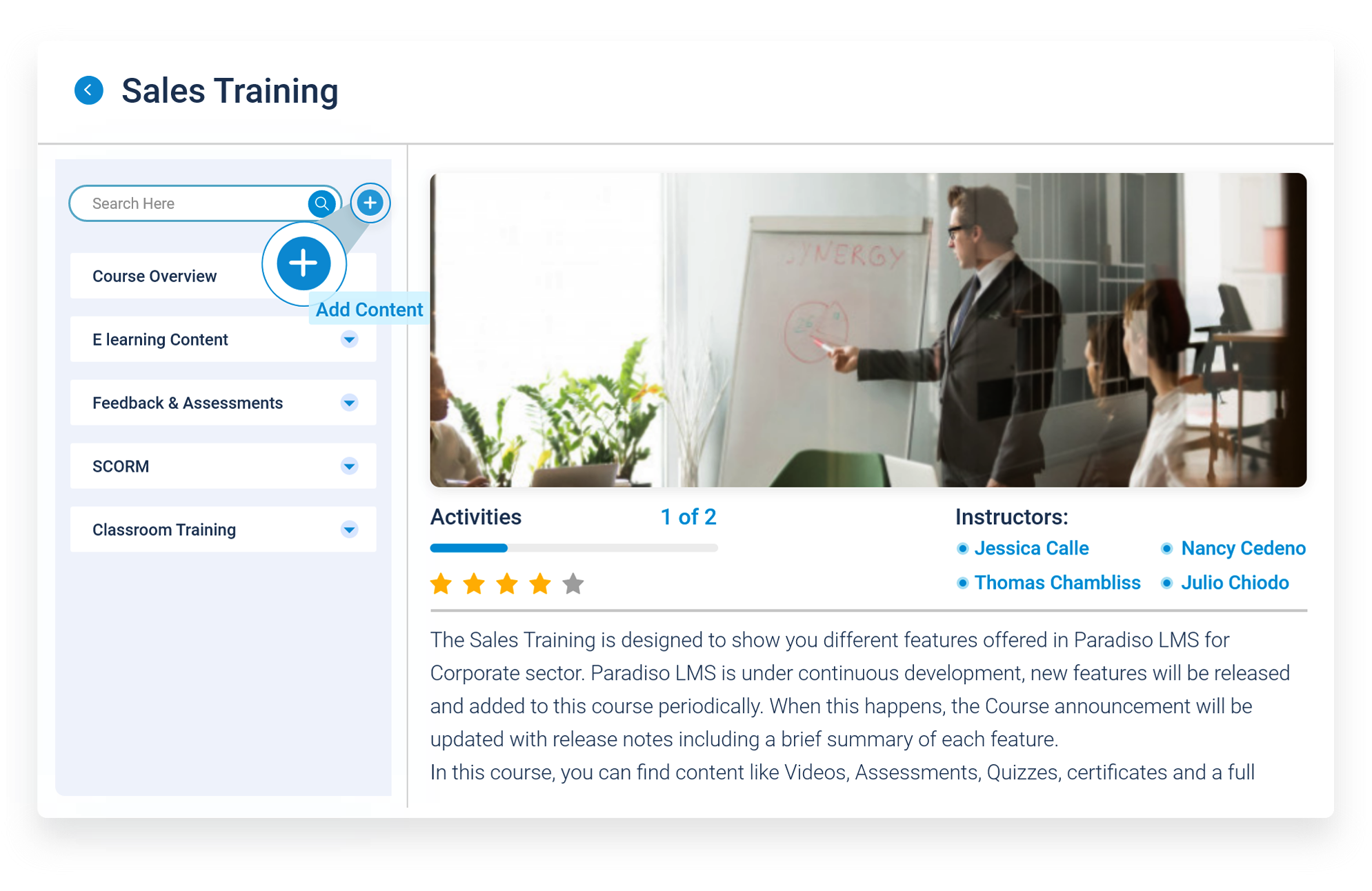
2. Search for “Zoom Meeting” from the activity popup or click “Virtual Class”, then select “Zoom Meeting” activity and click on “Add Activity”.
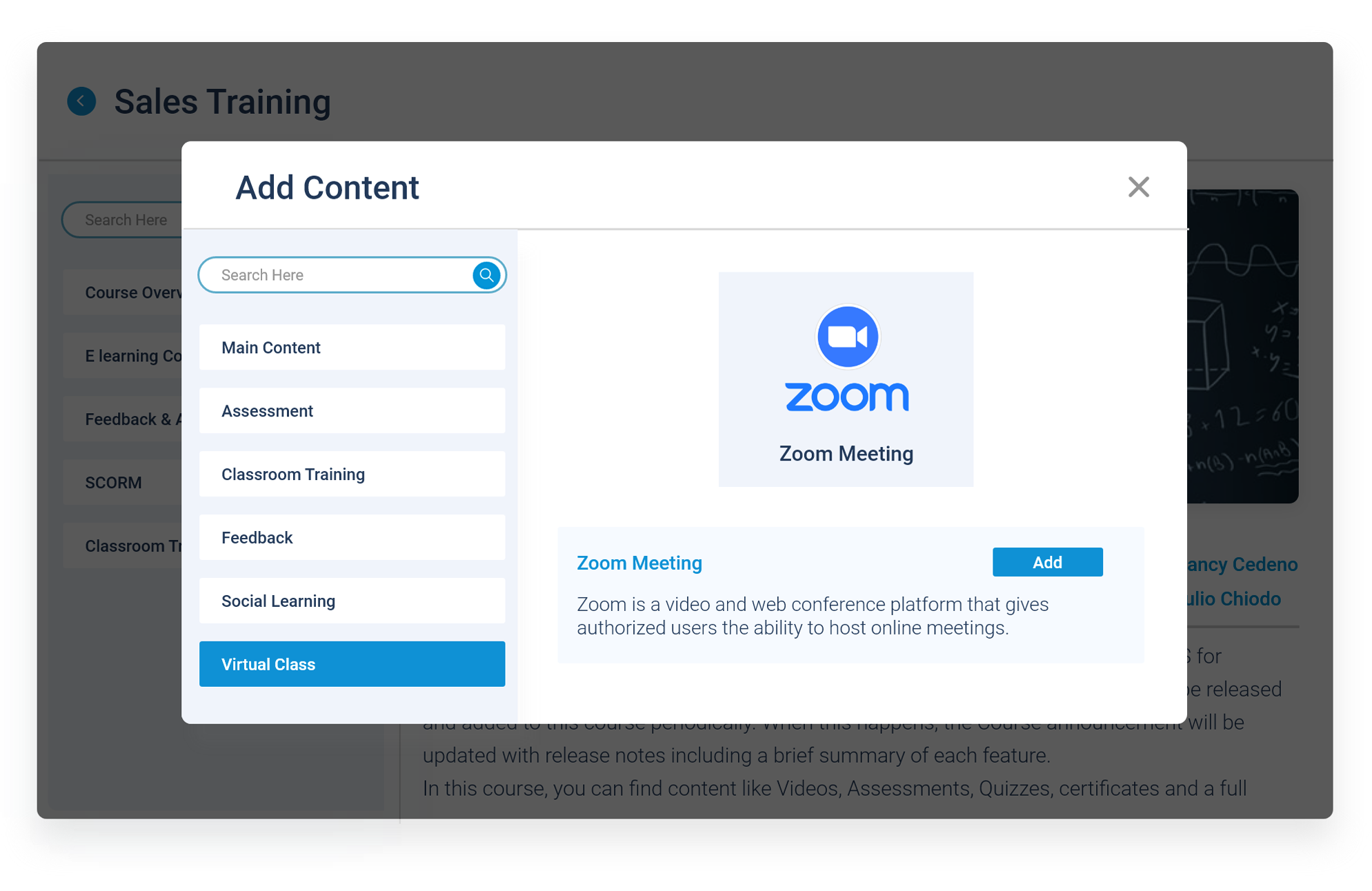
3. In the next screen, the next information will be required:
- Topic: enter topic/meeting name.
- Description: Add description for your meeting.
- When: Select the date and time when the meeting is going to start.
- Duration: choose the time you are planning your meeting to last. It can be hours, minutes or seconds.
- Password: If you want to require a password for your meeting’s attendees to enter the meeting.
- Host video: Select your host video preference.
- Participants video: select your attendees with video preferences.
- Audio options: Select your audio options to hear/ speak during the meeting.
- Meeting option: Enabling this option will allow your users to join the meeting before the host has started it.
4. In the Additional Advance Options, you have the chance to edit the Grade, Common module settings, restrict access, and activity completion.
5. After clicking on “Save”, you can see that the Zoom event has been created in the course.
This is just the tip of the iceberg of what our LMS can do! Zoom LMS Integration is just one of the fantastic integrations, our LMS is subjected to. We have some more of all the more cooler integrations happening at our end.
What to Look for in an LMS with Zoom Integration
Not all LMS platforms offer the same depth of Zoom integration. When evaluating an LMS, consider the following factors:
1. Native Integration vs. Basic Link Sharing
Some platforms only allow adding external Zoom links inside courses. A deeper integration enables embedded viewing via SDK, direct scheduling, attendance tracking, and recording synchronization inside the LMS.
2. Automation Capabilities
Look for features that automate email reminders, calendar syncing, session creation, and recording storage to eliminate administrative effort.
3. Security & Compliance
Ensure the integration supports encrypted data handling, role-based access control, and compliance certifications like ISO 27001, SOC 2 Type I & II, GDPR, CCPA, and HIPAA.
4. Accessibility Standards (WCAG 2.0 AA & Section 508)
Verify that the platform complies with WCAG 2.0 Level AA and Section 508 standards (backed by annual 3rd-party audits), offering closed captioning, screen-reader compatibility, and accessible controls for all learners.
5. Scalability & Infrastructure
The LMS should support multiple concurrent sessions and large-scale webinars supported by enterprise multi-cloud hosting (AWS/DigitalOcean) and a guaranteed SLA.
6. Reporting & Analytics
A strong integration combines Zoom participation data with course performance metrics to provide comprehensive learner insights.
Zoom LMS – As Easy as It Gets!
Zoom LMS supports Single Sign-On (SSO). This feature allows your users to log in to Zoom with a simple click from inside the LMS without the need to enter two sets of login details. The LMS stores the Zoom ID and password to ensure smooth authentication between the two platforms.
Besides, Zoom LMS gives employees an opportunity to meet each other virtually over a web-based portal. These meetings enable attendees to interact via video and audio, as well as share content files seamlessly. Presentations, document reviews, screen sharing, and passing host controls are fully supported.
For the integration of Zoom LMS, you won’t need your internal IT team to do heavy lifting. We handle the technical setup so you can enjoy instant synchronization between both portals. Our REST APIs and Webhooks make the connection smooth and reliable.
Experience a Paradiso LMS Demo to see the Zoom integration in action. Contact us today!
Already Using Zoom for Training? Make It Work Better with Your LMS
Explore how to connect your Zoom sessions with learner enrollment, attendance records, and training reports. Discuss your requirements with our team.
Frequently Asked Questions About Zoom LMS Integration
1. Can Zoom meetings be scheduled directly inside Paradiso LMS?
Yes, administrators and instructors can create and manage Zoom sessions directly from course modules without switching platforms.
2. Does Paradiso LMS support Zoom Single Sign-On (SSO)?
Yes. Users log into Paradiso LMS once and can join any authorized Zoom session with a single click via SAML, OAuth, Active Directory, Azure AD, Okta, or Google Workspace credentials.
3. Are Zoom recordings automatically stored in the LMS?
Yes. Once a live Zoom session concludes, the cloud recording automatically syncs and side-loads directly into the corresponding Paradiso course library for learner playback.
4. Is the Zoom integration secure?
Yes. Paradiso utilizes state-of-the-art encryption, OAuth 2.0 authentication, role-based access control, and operates under ISO 27001, SOC 2 Type I/II, GDPR, CCPA, and HIPAA compliant standards to ensure session data remains completely secure.