










AI
Roleplay
Practice with AI. Prepare for Reality.

CRM LMS Integration

CRM LMS Integration that Syncs Salesforce, HubSpot, and Dynamics with Your Training

Push contacts into training paths. Pull course completions back to the contact record. Two-way sync with the CRMs your team already runs.

+85%

Reduction in manual enrollment tasks

3x

Faster Lead-to-learning automation

50+

CRM and business system integrations

99.9%

Data synchronization accuracy

Trusted by 1000s of Companies Globally…

The Basics

What is CRM LMS integration?

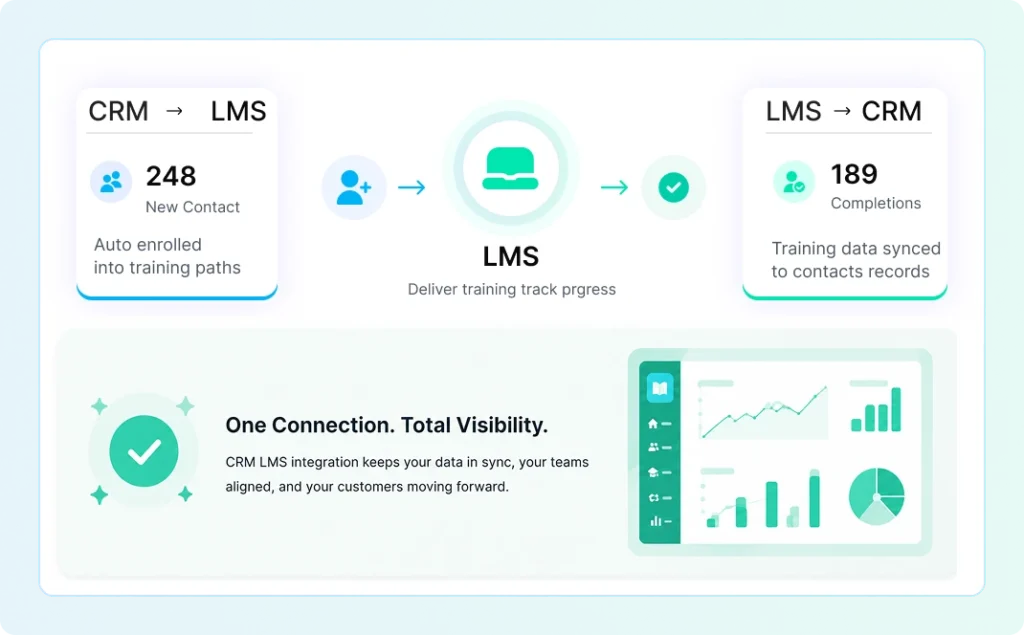
CRM LMS integration is the two-way connection between your customer relationship management system and your learning management system. Once the two are connected, contacts created in the CRM auto-enroll into training paths in the LMS, and training data flows back so it shows up on the contact record.

Without integration, the two systems do half the job each. Your Customer Success Manager cannot see if a customer finished onboarding. Your trainer cannot see when a contract renews. Reports require joining two CSV exports by hand.

With integration, both teams work off the same data. New customers get the right training automatically. Training completion drives renewal workflows. Reports run in one click.
LMS CRM Integration

Comparison

LMS vs CRM: what each does and where they overlap

People often ask if they can just use one system for both. The short answer is no. They serve different teams and store different data. Integration is what makes them feel like one platform.
CRM vs LMS Comparison Table
Dimension CRM LMS
Primary user Sales, marketing, customer success L&D, HR, training admins, learners
Core data Contacts, accounts, deals, pipeline Courses, enrollments, completions, certifications
Job to be done Track and grow revenue per customer Deliver training and prove competency
Example tools Salesforce, HubSpot, Dynamics, Zoho Paradiso, Docebo, Cornerstone, TalentLMS
Reporting style Pipeline, win rate, revenue Completion rate, time to certify, skill gaps

In practice

Six workflows Paradiso customers run with CRM integration

These are the patterns we see most often once a customer connects their CRM to Paradiso.

Auto-enroll new contacts

A contact moves into a 'Customer' or 'Onboarding' lifecycle stage in your CRM. Paradiso reads the stage change and enrolls them in the right training path. No CSV upload, no manual assignment, no waiting until Monday.

Show training status on the contact record

Your CSM opens the contact page in Salesforce or HubSpot and sees 'Completed: Product 101, Compliance 2026, Advanced Setup.' No tab-switching. No 'let me check the LMS and get back to you' on customer calls.

Trigger CRM workflows when training completes

Pass a certification, get a renewal reminder turned off. Fail a quiz, get a follow-up call assigned to the rep. Complete a partner certification, get added to the eligible-for-deal-registration list.

Sync deal-stage training

Partner training keyed to deal stage. When a partner moves into the 'Authorized' stage, Paradiso enrolls them in the next certification tier. Sales training keyed to rep onboarding milestones. When a new rep hits day 30, the 'Closing Skills' path opens up.

Run reports off one dataset

Pipeline by training status. Renewal probability by certification health. Partner revenue by certification tier. The kind of reports that today require an analyst to manually join two exports. After integration, they run in one click in your existing BI tool.

Honor SSO and permissions

Add a user to your CRM, they get provisioned in Paradiso with the right role. Remove them from the CRM, their Paradiso access revokes the same day. SAML SSO supported across Salesforce, Microsoft Entra ID, HubSpot, and Okta.

Stop guessing. Find LMS Solutions Aligned with Your Training Needs

Instant results · No spam · 2 min average.
LMS Needs Assessment - Step by Step
1 of 11

What is your industry?

What is the primary audience for your training program?

Approximately, How many users will be utilizing your software?

Which LMS capabilities are essential for your needs? (Select at least 3)

Selection required: Please select at least 3 capabilities (0 selected)

Does your LMS need to meet any compliance requirements? (Select all that apply)

Which deployment model do you prefer for your LMS?

Which integrations do you need? (Select all that apply)

Do you need course authoring tools?

Do you need an LMS that includes a library of pre-built courses, or just the platform?

What is your estimated project budget?

$
$5,000
$10,000
$25,000
$50,000
$100,000+

Your results are ready!

Enter your email to receive full recommendation, just enter your name and email address.

I agree to the terms of use and privacy policy

CRM-by-CRM

How Paradiso connects to your CRM

Every CRM has its own auth model, API patterns, and quirks. Paradiso built native connectors for the six most common ones in the L&D world. Pick yours below for what is supported and how the integration is set up.

Salesforce

Native AppExchange-listed integration. Two-way sync of contacts, accounts, opportunities, and any custom objects you define. SAML single sign-on, OAuth 2.0 for API calls, and field-level mapping for custom data. Tested with Sales Cloud, Service Cloud, and Experience Cloud. Common Paradiso uses: customer training tied to opportunity stage, partner training tied to account tier, and channel certification tracking.

HubSpot

Direct API integration. Sync contacts, companies, and deal stage straight into LMS enrollment. Push course completion and certification data back into the contact timeline so it shows up in the same view your sales team already uses. Trigger HubSpot workflows from training events. Common in mid-market SaaS, where HubSpot is the CRM and Paradiso runs customer training and onboarding.

Microsoft Dynamics 365

Native connector built for both Dynamics 365 Sales and Customer Service. Sync accounts, contacts, opportunities, and custom entities. Microsoft Entra ID SSO included. Supports both online and on-premise Dynamics deployments. Common in regulated industries where Microsoft is the standard stack and compliance training needs to feed back into the customer record.

Zoho CRM

Two-way sync via webhook plus REST API. Contacts, leads, and deal stage flow into Paradiso. Course completion flows back into custom fields on the contact. Near real-time updates, not the daily batch sync most LMS vendors offer for Zoho. Common with SMB Paradiso customers running Zoho One as their full stack.

Pipedrive

REST API integration. Sync persons and deal stage from Pipedrive into Paradiso. Trigger training paths from pipeline movement. Push course completion data back into deal custom fields. Common in sales training and channel partner enablement scenarios.

SugarCRM

REST API integration with OAuth 2.0. Sync accounts, contacts, opportunities, and leads. Two-way data flow. Supports SugarCRM Sell, Serve, and Enterprise. Common for customers who came to SugarCRM through a partner migration off Salesforce.

For your team

Use cases by team

CRM LMS integration looks different depending on who runs the CRM. Three patterns we see most often:

Customer Success Teams

Customer Success runs Salesforce or HubSpot. The job is to keep customers, grow them, and renew them. Integration maps onboarding stages to enrollment in Product 101. Pushes completion data back to the contact record so renewal forecasts include training health. Triggers a CSM alert when a customer skips required training before a key milestone. The result is fewer churn surprises and a renewal conversation that has data behind it.

Partner and Channel Teams

Channel teams run partner programs through Salesforce, HubSpot, or Dynamics. Integration keys partner training to deal stage. When a partner registers their first deal, the next certification tier unlocks. Certification expiry triggers a renewal workflow in the CRM 60 days out. Deal registration eligibility is gated by current certification status. The result is a partner program that actually enforces its own rules without manual review.

Sales Enablement and HR

Sales enablement runs from the CRM or HRIS. Integration syncs the rep's hire date and role into Paradiso, which auto-enrolls them in a tailored onboarding path. Manager dashboards surface training completion next to quota. Compliance training (POSH, security awareness, role-specific) refreshes on a schedule and flags missing certifications back to the CRM. The result is a sales onboarding program that ramps reps faster and an audit trail that holds up in a compliance review.

INFRASTRUCTURE

Built for Enterprise-Grade Demands

Seamless Integrations
API-First Architecture
Cloud Scalability
Data Privacy & Compliance
RESTful API with 99.9% uptime
Comprehensive API documentation
Webhook support for real-time events
GraphQL endpoint for flexible queries
Rate limiting: 10,000 requests/hour
Multiple SDK libraries available
View API Docs
99.9% uptime SLA guarantee
Auto-scaling infrastructure
Global CDN with 200+ locations
Load balancing across regions
Automatic failover & redundancy
Support for 10M+ concurrent users
View API Docs
AICPA SOC 2
Type II Certified
Audited security & confidentiality
ISO 27001
Information Security
International standard certified

GDPR
EU Compliant
European data protection
HIPAA
Healthcare Compliant
Protected health information
Enterprise Encryption
AES-256 at rest
TLS 1.3 in transit
End-to-end encryption
Access Control
Role-based permissions
Multi-factor authentication
SSO integration
Compliance & Audit
Complete audit logs
Automated reports
Third-party audits
Data Sovereignty
Multi-region hosting
Data residency options
Geographic redundancy

Case Studies

See How Companies Are Transforming Their Learning Experience

Real stories from businesses that trust our LMS solutions

Got Questions?

Frequently Asked Questions

Can’t find what you’re looking for? Talk to our team.
CRM LMS integration is the two-way data connection between your CRM and your LMS. Contacts flow from CRM into LMS enrollment, and training data (completion, scores, certifications) flows back to the contact record. The result is one set of customer data instead of two.
Less manual data entry, training data visible on every contact record, automated enrollment based on CRM lifecycle stage, single sign-on for learners, reports that combine CRM and training data in one view, and triggered workflows when training milestones happen.
Yes. Native integration listed on Salesforce AppExchange. Two-way sync of contacts, accounts, opportunities, and custom objects. Single sign-on via SAML. Setup is typically 2 to 3 weeks.
A CRM manages customer and contact data (pipeline, deals, accounts). An LMS manages training (courses, enrollment, certifications). They serve different teams and store different data. Integration connects them so customer data informs training and training data informs customer workflows.
Yes. Data flows from CRM to LMS and back. You can configure direction per field during setup. For example, contact info can be CRM-to-LMS only, while completion data is LMS-to-CRM only.
Yes. Paradiso supports custom integrations via REST API, webhook, and middleware like Zapier or Make. Talk to an integration engineer about your stack and we will scope what is involved.

Get Started

Discover How LMS-CRM Integration Can Transform Training

Connect your CRM and LMS to automate training journeys, streamline reporting, and gain complete visibility across customer, partner, and employee learning programs.

Try AI Roleplay Simulation
for Business Use Cases

eva img

50+

SCENARIOS

Real-time

AI FEEDBACK

10K+

USERS

WhatsApp Chat