










Salesforce LMS
The Salesforce LMS Integration Built for Revenue-Driven L&D
Trusted by 1000s of Companies Globally…


The Business Case
6 Reasons Your Training Program Needs a Salesforce LMS
Drive Revenue Intelligence
with Unified Data
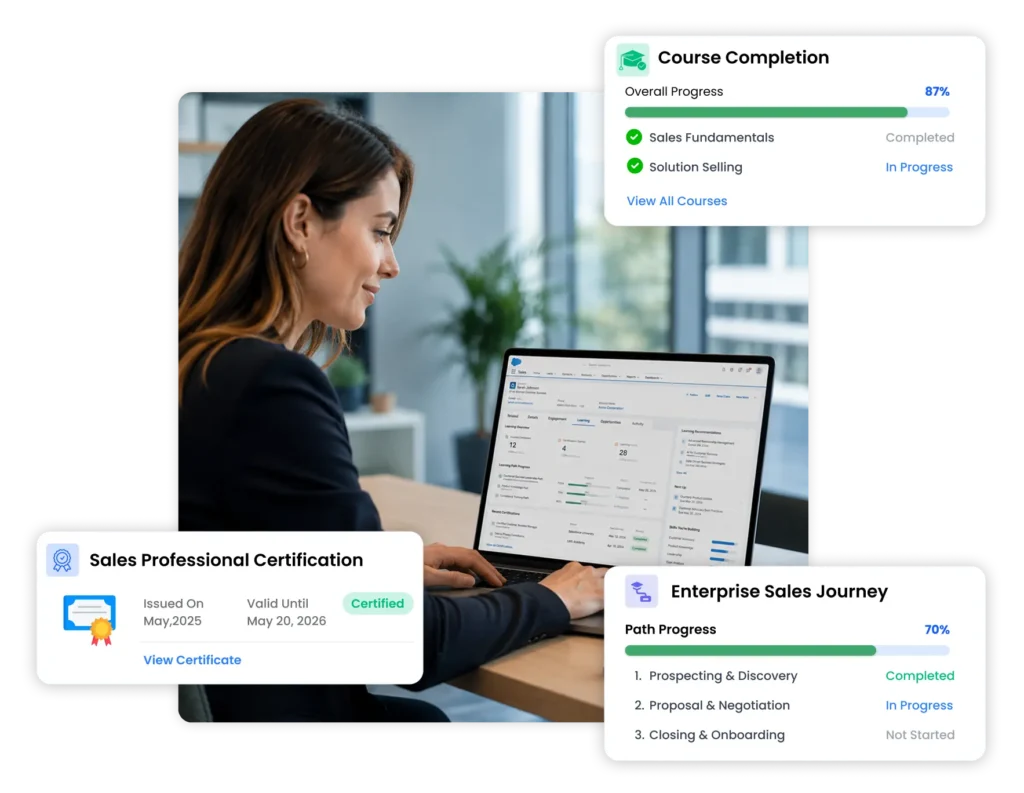
See every rep's training completion and pipeline in one Salesforce record. Course completions and certifications sync to Contact and Opportunity objects, so coaching conversations start with data - not guesswork.
Governance & Compliance at Scale
Certification expiry, auto-renewal enrollment, and compliance dashboards sync directly to Salesforce records. IT and Legal get audit-ready reports without leaving the CRM they already own.
Strategic Decision-Making with Salesforce-Native Dashboards
Training data lives in Salesforce Reports - not a separate BI tool. CLOs and Sales Ops see learning progress and pipeline in one view, enabling data-driven L&D investment decisions.
Establish a Single Source of Truth
Eliminate the disconnect between your CRM and LMS. Valuable customer data that lives in Salesforce is now connected to training outcomes - no more manual exports, no more spreadsheet reconciliation.
Enable Learning in the Flow of Work
Reps access training directly from a Salesforce Contact or Lead record - without switching apps. Role-based auto-enrollment triggers the moment a new hire is added to a Salesforce profile.
Partner & Customer Education - Efficiently
Deliver partner certification through Salesforce Experience Cloud. Trigger customer onboarding learning paths from closed-won Opportunities. Track completion as a health signal in your CSM dashboard.
Paradiso's 2026 Moat
The Salesforce LMS
with AI authoring, AI roleplay, and AI Coach built in
Paradiso includes AI course creation, AI roleplay simulation, and AI Coach – all AppExchange-native, all in one platform.
✍️ AI Course Authoring
🎭 AI Roleplay Simulator
🤖 AI Tutoring & Coaching
☁️ AppExchange Native
What Paradiso includes that competitors don't
Paradiso Authoring Tool (PAT)
Generate SCORM-ready courses from a prompt or PPT in minutes. AI voiceover, quizzes, and interactions included — no third-party tool or separate subscription required.
ADD-ON
AI Roleplay for Sales Training
Reps practice objection handling with an AI buyer persona - scored, tracked, and logged to the Salesforce Contact record. Skilljar, Docebo, Litmos, and LearnUpon have no equivalent.
ADD-ON
AI Tutoring / Coach & Personalized Paths
Adaptive learning paths triggered by Salesforce role, Opportunity stage, or skill gap data. Learning responds to CRM signals — not static enrollment schedules.
ADD-ON
Use Cases
One Salesforce LMS Integration.
Three Audiences. One Platform.
For Sales Enablement Leaders
Cut sales rep ramp time by up to 40% without leaving Salesforce
40%
Faster rep ramp time vs. non-integrated LMS
For Partner & Channel Programs
Certify partners 3× faster through Salesforce Experience Cloud
3×
Faster partner certification cycle vs. standalone LMS
For Customer Education & CS Teams
Reduce support tickets by 35% through structured product education
35%
Reduction in support ticket volume post-training
Salesforce-Native Capabilities
LMS Features Built Specifically for Salesforce
Not bolt-on connectors. Not middleware workarounds like Zapier. Native Salesforce capabilities that your Salesforce Admin can configure – no custom code required.
Salesforce SSO + JIT Provisioning
Single sign-on via Salesforce Identity. Just-in-time user provisioning from Salesforce profiles – no manual account creation, no separate login.
Bi-Directional Data Sync
Course completions → Opportunity. Certification → Contact. Quiz scores → User record. Real-time sync, not batch. Your Salesforce data is always current.
Role-Based Auto-Enrollment
Automatically enroll users in learning paths based on Salesforce Profile, Role, or Opportunity stage. The trigger other LMS only partially support – fully native in Paradiso.
Reports & Dashboards Inside Salesforce
Training data lives in Salesforce Reports – not a separate analytics tool. Unlike other LMS (which requires data export for custom reports), Paradiso data is drag-and-drop reportable inside Salesforce.
Embedded LMS UI -
No App-Switching
Learners access courses from within Salesforce Sales Cloud, Service Cloud, or Experience Cloud. Zero context-switching. Start on desktop, continue on mobile – session preserved.
AppExchange Managed Package + Secure API
Installed from the Salesforce AppExchange as a managed package. Full API access for custom object mapping. SCORM 1.2, SCORM 2004, AICC, and xAPI (Tin Can) compliant.
INFRASTRUCTURE
Built for Enterprise-Grade Demands
Got Questions?
Frequently Asked Questions
Yes. Paradiso LMS is available as a certified managed package on the Salesforce AppExchange. It installs directly into your Salesforce org – no external deployment required. Your Salesforce Admin can install and configure it without developer support.
Paradiso uses a bi-directional API sync via a Salesforce AppExchange managed package. Course completions, certifications, and quiz scores write back to Salesforce Contact, User, and Opportunity objects in real time. Enrollment can be triggered by Salesforce profile, role, or opportunity stage – no custom code required.
Yes. Paradiso supports SOC 2, GDPR, HIPAA, SCORM 1.2 & 2004, and xAPI (Tin Can). Certification expiry tracking, auto-renewal enrollment, and compliance dashboards sync directly to Salesforce records.
Paradiso integrates with Salesforce Sales Cloud, Service Cloud, and Experience Cloud. Compatible with Salesforce Enterprise and Unlimited editions, and both Salesforce Classic and Lightning Experience.
Most customers go live in 2–4 weeks. This includes AppExchange installation, SSO setup, bi-directional data sync, content migration, and admin training. A named implementation manager is assigned at kickoff.
Trailhead is purpose-built for Salesforce product training. It does not support custom course creation, partner certification programs, AI authoring, SCORM/xAPI content, or extended enterprise training for non-Salesforce topics. Paradiso extends what Trailhead can’t do – and lives in the same Salesforce org.
Simply contact us to schedule a consultation, and we will guide you through the process from discovery to deployment.
Get Started