- Home
- Jan 12, 2026
What Is an LMS? Learning Management Systems Explained

Olivia Dodd
Learning And Development Specialist
Quick Answer: What Is an LMS?
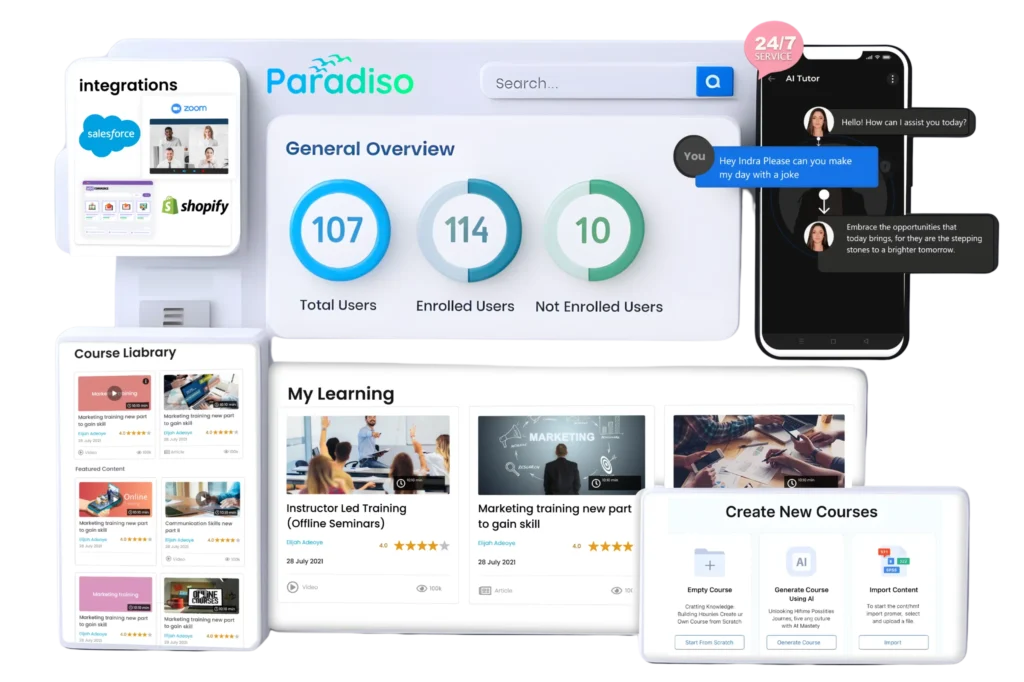
An LMS is a central online platform that helps an organization manage learning at scale. Administrators can upload or build courses, enroll the right people, set deadlines, automate reminders, record results, and report on participation. Learners can access assigned or optional content from a browser or mobile device and continue from where they stopped.
The exact feature set varies by product. A simple LMS may provide course hosting, quizzes, progress tracking, and basic reports. An enterprise LMS may add multiple branded portals, advanced permissions, automated learning paths, virtual classrooms, e-commerce, integrations, skills management, artificial intelligence, and detailed analytics.
In short:
- LMS stands for learning management system.
- Its purpose is to manage learning content, learners, delivery, and records in one place.
- Common uses include onboarding, compliance, professional development, academic instruction, customer education, and partner training.
- Most organizations buy a cloud-based LMS, although on-premise and open-source options remain available.
- Pricing commonly depends on active users, registered users, usage, features, portals, or a negotiated enterprise contract.
What Does LMS Stand For?
LMS stands for learning management system. “Learning” refers to courses, resources, practice activities, and other experiences intended to build knowledge or skills. “Management” covers enrollment, permissions, assignments, deadlines, reminders, completion rules, and reporting. “System” is the technology that brings those functions together and connects them with other business or education software.
The term is sometimes used loosely for any digital learning product, but an LMS has a distinct administrative role. A video library can host content, and an authoring tool can build a course, but neither necessarily manages audiences, assignments, progress, certification, and reporting across an organization. Some modern products combine several categories, which is why buyers should evaluate capabilities rather than relying only on labels.
A Simple LMS Example
Imagine a company hiring 50 people across several locations. Its learning team creates an onboarding program, assigns different modules to managers and individual contributors, requires everyone to complete data-security training, and sets deadlines. The LMS automatically enrolls each person, records quiz scores, reminds overdue learners, and gives HR a completion report.
Without an LMS, the same company might send links by email, collect acknowledgements through forms, and update a spreadsheet manually. That can work for a small group, but it becomes difficult to maintain when roles change, employees leave, certifications expire, or auditors request reliable evidence.
What Is a Learning Management System
in Plain English?
In plain English, an LMS is the online home for a learning program. It is where learners find training and where administrators control who must take it, when it is due, and what counts as completion. It also stores the evidence that the learning activity happened.
Most platforms organize that work around three connected areas. Content includes videos, documents, interactive lessons, live sessions, assignments, and quizzes. People include learners, instructors, managers, administrators, customers, or partners. Records include enrollment status, time spent, attempts, scores, completions, certificates, and other data needed to understand participation and results.
What an LMS Does for Administrators
That depends on the vendor, but a legitimate LMS treats this as a design requirement, not an afterthought. Worth checking before you buy: single sign-on support, data encryption, and role-based access control, so a learner account can’t see admin-level data by accident.
For regulated industries, also check which compliance standards the vendor actually meets: GDPR for data privacy, SOC 2 for security practices generally, and HIPAA specifically if you’re in healthcare.
If a vendor can’t give you a straight answer on which of those they meet, treat that as a real red flag, not a minor gap. See what SOC 2 compliance actually means if you’re vetting vendors on this specifically.
What an LMS Does for Learners
Learners see a personalized dashboard containing required courses, deadlines, progress, recommendations, and completed certificates. They may search a catalog, join a live class, submit an assignment, take a test, participate in a discussion, or follow a structured learning path.
Good learner experiences reduce friction. Features such as single sign-on, mobile-responsive pages, captions, clear navigation, accessible assessments, reminders, and useful search help people concentrate on learning instead of figuring out the platform.
How Does an LMS Work?
An LMS turns a training plan into a repeatable workflow. An administrator adds content or connects a content provider, sets enrollment and completion rules, and publishes the course. The platform delivers it to the intended audience, captures learner activity, applies pass or completion criteria, and makes the results available in dashboards or reports.
The workflow can be self-paced, instructor-led, or blended. A self-paced course might contain a video, interactive module, knowledge check, and final assessment. An instructor-led course may include registration, attendance, waitlists, and a virtual or physical classroom. A blended program can combine both, for example, prerequisite e-learning followed by a live workshop and an on-the-job evaluation.
The Typical LMS Workflow
- Create or import content. Build a course in the LMS, upload files and video, or import standards-based content from an authoring tool.
- Organize the program. Group courses into curricula, certifications, learning paths, or catalogs.
- Add learners. Import users, connect an HR system, enable self-registration, or create accounts through an API.
- Assign learning. Enroll people individually or use rules based on role, department, location, customer, or other attributes.
- Deliver the experience. Learners complete self-paced modules, live sessions, discussions, practice, or assessments.
- Track results. The LMS records progress, scores, attempts, attendance, completions, and credentials.
- Report and improve. Administrators review participation and outcomes, follow up with learners, and revise content or rules.
How an LMS Tracks Completion
Completion is not always the same as learning. A platform may mark a course complete when a learner views every page, spends a minimum amount of time, attends a session, passes an assessment, receives an instructor approval, or completes a combination of requirements.
Organizations should define completion rules deliberately. For high-risk compliance topics, merely opening a document may be weak evidence. A scored assessment, acknowledgement, observed task, or recurring recertification may provide a more defensible record, depending on the requirement.
What Are the Main Features of an LMS?
Most LMS products share a core set of functions, but the depth of each function differs. A vendor may check a feature-list box while offering only a basic implementation, so buyers should test real workflows during demonstrations and trials.
The best feature set is the one that supports the organization’s audience, content, administrative capacity, and reporting obligations. A school, a hospital, and a software company training customers may all use an LMS, but they will prioritize different capabilities.
Course and Content Management
An LMS can host videos, documents, presentations, links, quizzes, surveys, and interactive e-learning. Many products include simple authoring, while more complex courses are built in a dedicated authoring tool and then imported. Version control, content reuse, prerequisites, due dates, and learning paths help teams maintain large catalogs.
Buyers should check upload limits, supported formats, video delivery, multilingual content, versioning behavior, and whether an updated course preserves historic completion records. Those operational details often matter more than the number of content types shown on a feature page.
User, Role, and Enrollment Management
User management determines who can enter the LMS and what each person can see or do. Roles commonly include learner, instructor, manager, reporter, and administrator. Groups or audiences can represent departments, locations, job roles, cohorts, clients, or partners.
Enrollment may be manual, self-service, bulk imported, purchased through e-commerce, or automated from another system. Strong platforms can apply dynamic rules, so new hires or people moving into regulated roles receive the right training without an administrator updating every account.
Assessments, Certificates, and Compliance
Assessment tools may include multiple-choice questions, question banks, randomization, assignments, practical observations, surveys, and proctored exams. Rules can control passing scores, attempts, feedback, retakes, and prerequisites.
For certification programs, the LMS may issue downloadable credentials, set expiration dates, trigger renewal paths, and send reminders. An audit-ready record should show who completed what, which version they completed, when they completed it, and how the result was determined.
Reporting and Analytics
Basic reports show enrollment, status, completion, overdue learning, scores, and certificates. More advanced systems support scheduled reports, custom fields, manager dashboards, data exports, visual analytics, and connections to business-intelligence tools.
Useful reporting starts with a decision, not a dashboard. A compliance manager may need proof of current certification; an onboarding owner may need time-to-completion and early attrition signals; a customer education team may want to compare training participation with product adoption or support demand.
Mobile Learning, Social Learning, and Gamification
A responsive LMS lets learners use the platform on phones and tablets. Some products also provide native apps, offline downloads, push notifications, and mobile-friendly assessments. Buyers should test actual course content on smaller screens because a mobile app does not automatically make every imported course mobile-friendly.
Discussion boards, peer groups, user-generated content, badges, points, and leaderboards can add participation and recognition. These features work best when they reinforce a meaningful behavior; gamification without a clear learning purpose can reward clicks rather than competence.
E-commerce and Extended Enterprise
Training providers and associations may need catalogs, payments, subscriptions, discount codes, taxes, bundles, and customer account management. A corporate extended-enterprise LMS may instead focus on separate branded portals, delegated administration, audience-specific catalogs, and reporting for distributors or customers.
These use cases require careful attention to scale and data separation. A platform should make it easy to give each external audience an appropriate experience without exposing another organization’s users, content, or reports.
Does an LMS Integrate With Other Software?
Yes. Integrations prevent an LMS from becoming another isolated database that administrators must maintain manually. A connection can automatically create users, update attributes, launch an external learning tool, synchronize attendance, share completion data, or connect training activity with business outcomes.
Organizations should map both the system of record and the direction of data flow. For example, the HR platform may own employee status and department, while the LMS owns course completion. Deciding which system is authoritative prevents duplicate profiles, stale data, and conflicting reports.
Common LMS Integrations
- HRIS or HCM: Workday, SAP SuccessFactors, BambooHR, ADP, or another people system can provision users and trigger assignments based on employment data.
- Identity provider and SSO: Microsoft Entra ID, Okta, Google, or another identity provider can simplify access and support centralized authentication controls.
- CRM: Salesforce, HubSpot, or another CRM can connect customer and partner education to accounts, lifecycle stages, product adoption, or revenue.
- Virtual classroom: Microsoft Teams, Zoom, Webex, and similar tools can support scheduling, joining, and attendance capture.
- Content libraries: External libraries can make licensed courses discoverable from the LMS catalog.
- Business intelligence: A warehouse or BI tool can combine learning records with operational, talent, customer, or financial data.
- E-commerce and payments: Payment gateways, tax tools, and storefronts support paid training.
APIs, Webhooks, and Prebuilt Connectors
A prebuilt connector is usually faster to deploy but may support only common fields and workflows. An application programming interface (API) gives developers more control over reading or writing data. A webhook tells another system that an event has occurred, such as a course completion, instead of waiting for that system to request updates.
When evaluating an integration, ask about supported objects, update frequency, error handling, rate limits, monitoring, data ownership, and additional fees. For a closer look at a common high-value connection, read Paradiso’s guide to [LMS integration].
Which LMS Standards and Content Formats Matter?
Learning technology standards help content and systems exchange information. They can reduce vendor lock-in and make it easier to reuse courses, connect external tools, or collect learning data. Support is not always all-or-nothing: two products may both claim a standard but differ in the versions, features, and reporting they implement.
Buyers should identify the standards used by their existing content and tools, then test representative files and workflows. A conformance claim is useful, but a practical pilot reveals whether bookmarking, scores, completions, mobile behavior, and reports work as expected.
SCORM
SCORM is a widely used set of specifications for packaging web-based learning content and communicating with an LMS. It commonly lets a course report information such as completion, pass or fail status, score, and bookmarking. ADL guidance explains that SCORM content packages are designed to be moved between conformant systems, although real-world portability should still be tested. See Paradiso’s [guide to SCORM-compliant LMS platforms]
SCORM remains common for self-paced courseware, but it was designed around content running through an LMS session. It is not the ideal model for every learning activity, especially experiences happening across apps, devices, simulations, or offline environments.
xAPI and Learning Record Stores
The Experience API, usually called xAPI, can describe learning and performance activities as statements and send them to a learning record store (LRS). This model can capture a broader range of experiences than a traditional course launch, including simulations, mobile activities, games, or observed work.
An LMS may contain an LRS or connect to one, but the terms are not interchangeable. Buyers should ask which xAPI profiles, statements, reporting workflows, and data exports are supported rather than treating “xAPI compatible” as a complete requirement.
read Paradiso Solutions blog related to “xAPI vs. SCORM: Choosing the Right Standard“
LTI, AICC, cmi5, and Other Formats
Learning Tools Interoperability (LTI) is especially important in education because it connects an LMS with remote tools and content in a standardized way. According to [1EdTech’s official LTI overview], the specification allows learning platforms to integrate external tools without treating each connection as a completely custom project.
AICC is an older interoperability specification still found in some legacy content. cmi5 combines xAPI-based data with rules for launching and managing course content. Common file types such as MP4 video, PDF, HTML, and office documents also matter, but simply uploading a file usually provides less detailed tracking than a purpose-built learning package or assessment.
Is an LMS Secure, Private, and Accessible?
An LMS can hold names, email addresses, employment or enrollment attributes, assessment results, activity histories, and certification records. Security and privacy therefore need to be evaluated as system requirements. A recognizable vendor name or cloud deployment does not by itself demonstrate that a particular configuration, process, or integration is secure.
Accessibility matters for the same reason: training is only effective if the intended audience can use it. Platform accessibility and content accessibility are separate responsibilities. An accessible interface cannot repair an uncaptioned video or an interaction that requires precise mouse movement.
Security and Privacy Questions to Ask
Look for encryption in transit and at rest, role-based access, multifactor authentication or SSO, logging, backups, disaster recovery, vulnerability management, incident response, secure development practices, and independent assurance appropriate to the risk. Ask where data is hosted, who can access it, how long it is retained, and how it can be exported or deleted.
Regulatory needs depend on the organization and data. The EU’s GDPR principles include purpose limitation, data minimization, storage limitation, integrity and confidentiality, and accountability; see the [European Commission’s GDPR principles]. Healthcare organizations dealing with electronic protected health information should assess applicable safeguards and vendor responsibilities using [HHS Security Rule guidance]. A SOC 2 report can provide useful independent assurance about defined controls, but buyers should review its scope, period, exceptions, and relevant services rather than relying on a logo. Paradiso also provides an introduction to [what SOC 2 compliance means].
Accessibility Requirements
An accessibility review should cover keyboard navigation, focus behavior, screen-reader compatibility, color contrast, captions and transcripts, text alternatives, forms, time limits, authentication, and assessment interactions. The [W3C Web Content Accessibility Guidelines (WCAG) 2.2] provide testable criteria organized around content being perceivable, operable, understandable, and robust.
Ask vendors for a current accessibility conformance report, but also test the workflows your learners will actually use. Include people with disabilities in evaluation where possible and check imported content, not just the LMS interface.
Who Uses an LMS?
Any organization that needs to deliver repeatable learning to more than a small group can benefit from an LMS. The common denominator is not industry; it is the need to coordinate content, people, and evidence without relying on manual administration.
The audience affects platform design. Employees often arrive through an HR integration, students need academic workflows, customers may self-register, and partners may require separate branding or delegated administration. A system designed for one audience can sometimes serve another, but buyers should test the complete journey.
Corporate and Employee Training
Companies use LMS platforms for new-hire onboarding, required compliance, cybersecurity awareness, product training, sales enablement, leadership development, technical skills, and role-based career paths. Managers can monitor their teams while learning teams manage consistent programs across locations.
The strongest programs connect learning to work. That may mean combining LMS records with performance indicators, adding manager practice and coaching, or measuring whether people apply a skill after completing a course.
Learn more about Paradiso’s [Corporate LMS]
Schools, Colleges, and Universities
Educational institutions use LMS platforms to distribute materials, collect assignments, facilitate discussions, conduct assessments, manage grades, and support online or blended teaching. In some regions the term virtual learning environment (VLE) is also common.
Academic buyers often prioritize course templates, rosters, gradebook workflows, term structures, student-information-system integration, LTI tools, accessibility, and communication between teachers and students. These needs differ from corporate certification and organizational-hierarchy workflows.
Healthcare, Government, and Regulated Industries
Healthcare organizations, government agencies, financial services firms, manufacturers, and other regulated employers use LMS platforms to assign required training and maintain evidence. Recurring certification, policy acknowledgement, role-specific curricula, and reliable historical records can be central requirements.
The LMS supports the process but does not make a program compliant automatically. The organization still needs correct content, appropriate rules, governance, records, and follow-up based on its legal and operational obligations.
Customer, Partner, Member, and Franchise Training
Software companies can educate customers on implementation and product use; manufacturers can train distributors and technicians; associations can provide continuing education; and franchises can standardize operational learning. This is often called external, extended-enterprise, or customer education.
External audiences make self-registration, e-commerce, audience separation, localization, branding, delegated administration, and CRM integration more important. Success may be measured through product adoption, support deflection, renewal, partner readiness, or training revenue—not only course completion.
What Are the Benefits and Limitations of an LMS?
An LMS makes learning more consistent, scalable, and measurable. Automation reduces time spent enrolling users, sending reminders, grading simple assessments, issuing certificates, and assembling reports. Central records can also make it easier to answer operational or audit questions.
The platform is infrastructure, not a substitute for a sound learning strategy. Poor content in a new LMS is still poor content, and a completion report does not prove behavior change. Organizations get more value when they combine the technology with clear goals, relevant practice, capable instructors or managers, communications, and ongoing evaluation.
Main Benefits
- A consistent learner experience across teams and locations
- Faster enrollment, reminders, certification, and reporting
- Central records for compliance and audit support
- Reusable content and a lower marginal delivery cost at scale
- Flexible self-paced, live, virtual, and blended delivery
- Personalized assignments based on role, audience, or need
- Visibility into participation, progress, and assessment results
- A foundation for customer, partner, or member education
Common Limitations and Risks
Implementation can take more time than expected when user data is poor, integrations are complex, content needs rebuilding, or ownership is unclear. License fees are only one part of cost; configuration, migration, administration, support, content production, change management, and integration maintenance also matter.
Learner adoption can suffer when navigation is confusing, content is too long, search is weak, notifications are excessive, or mobile and accessibility needs are ignored. Organizations should also avoid measuring success only through logins and completions, which describe activity but not necessarily knowledge, performance, or business impact.
LMS vs. LXP, Authoring Tool, LCMS, and Learning Portal
Learning technology categories overlap, and many vendors offer combined platforms. The easiest way to distinguish them is by their primary job: an LMS manages delivery and records, an LXP supports discovery and learner-led exploration, and an authoring tool creates interactive content.
An organization may need more than one component. For example, a course could be created in an authoring tool, delivered and tracked in an LMS, recommended through an LXP-style experience, and analyzed alongside work data in a BI platform.
| Technology | Primary purpose | Typical strengths |
|---|---|---|
| LMS | Administer and track structured learning | Assignments, completions, certification, reports |
| LXP | Help learners discover and share learning | Recommendations, search, curation, social learning |
| Authoring tool | Create interactive course content | Templates, interactions, media, assessments, publishing |
| LCMS | Manage reusable learning content at a granular level | Collaborative authoring, components, versions, reuse |
| Learning portal | Give an audience a branded entry point | Catalog, navigation, audience-specific experience |
LMS vs. LXP
An LMS is usually administrator-led: the organization assigns defined training and tracks required outcomes. An LXP is usually learner-led: people browse, search, follow recommendations, and curate resources. Compliance, certification, and onboarding often suit the structured LMS model, while broad professional exploration may benefit from LXP capabilities.
The distinction is no longer absolute. Many LMS products now offer recommendations, content aggregation, skills profiles, and social learning, while some LXPs provide assignments and reporting. Evaluate the workflows and governance you need rather than buying a category name.
LMS vs. Authoring Tool
An eLearning authoring tool builds the learning experience; an LMS delivers it to an audience and records results. Some LMS platforms include built-in authoring for simple lessons, while specialist authoring tools provide more control over interactions, simulations, responsive design, collaboration, and publishing formats.
If a team already owns a large library of authored content, compatibility testing is essential. If it needs to update courses frequently with a small team, ease of authoring and content reuse may carry more weight than sophisticated visual effects.
What Types of LMS Are Available?
LMS products can be classified by hosting model, licensing model, audience, and specialization. These categories can overlap: a product may be cloud-based, proprietary, enterprise-focused, and designed for extended-enterprise training at the same time.
The right type depends on control, security, IT capacity, speed, customization, scale, and total cost. A theoretically flexible option can become expensive if the organization lacks the people to operate it.
Cloud-Based or SaaS LMS
A software-as-a-service LMS is hosted and maintained by the vendor and accessed through a browser or app. The vendor typically manages infrastructure, updates, and availability, while the customer configures the learning environment and governs its data and users.
Cloud deployment usually provides faster implementation and less infrastructure work, but customers should still examine data location, backups, availability commitments, release management, configuration limits, and exit options. Read more in Paradiso’s guide to [cloud-based LMS platforms].
On-Premise or Self-Hosted LMS
An on-premise LMS runs in infrastructure controlled by the organization or its hosting partner. This model can provide more control over environment and change management, which may suit some security, sovereignty, integration, or customization requirements.
That control also creates responsibility for deployment, updates, monitoring, capacity, backups, security, and specialist staffing. Buyers should compare the full operating model rather than assuming self-hosting is automatically cheaper or safer.
Open-Source and Proprietary LMS
Open-source software makes source code available under its license and can provide flexibility and ecosystem choice. The software license may be free, but implementation, hosting, themes, plugins, upgrades, testing, support, and administration still have costs.
Proprietary products are licensed from a vendor and commonly bundle hosting, upgrades, support, and product development. They may be faster to operate but offer less source-level control. Paradiso’s [open-source vs. proprietary LMS comparison]explores the trade-off.
Academic, Corporate, and Extended-Enterprise LMS
Academic systems emphasize classes, terms, assignments, gradebooks, and student workflows. Corporate systems emphasize organizational structure, role-based assignments, compliance, certification, managers, and HR integration. Extended-enterprise platforms emphasize external registration, separate audiences, portals, branding, CRM data, or commerce.
Examples in the broad LMS market include Paradiso LMS, Moodle, Canvas, D2L Brightspace, Blackboard Learn, TalentLMS, Docebo, Absorb LMS, Cornerstone, and SAP learning products. A name on a list is not a recommendation; suitability depends on requirements, product edition, region, service model, and implementation quality.
How Much Does an LMS Cost?
LMS cost ranges from a small monthly subscription to a large annual enterprise contract plus implementation and services. Published starting prices can be useful for screening, but a realistic comparison needs a common usage scenario and a three- to five-year total cost of ownership.
The largest price drivers often include the number and type of users, active-user definition, features, external portals, storage or bandwidth, integrations, service level, support, migration, customization, and contract length. An apparently inexpensive plan can become costly if essential capabilities are separate add-ons.
Common Pricing Models
- Registered user: Price is based on every account in the system.
- Active user: Price is based on learners active during a defined period.
- Monthly active user: Usage is counted separately each month.
- Concurrent user: Price reflects the number of simultaneous users.
- Usage or consumption: Charges may depend on registrations, course access, transactions, storage, or another unit.
- Tiered subscription: A package includes a user allowance and defined features.
- Enterprise license: A negotiated annual agreement may cover a large population, products, or services.
- Open source/self-hosted: There may be no software license fee, but operating and support costs remain.
Costs Beyond the License
Budget for implementation, configuration, branding, data cleanup, migration, integrations, identity management, content conversion, administrator training, support, testing, analytics, and change management. Also account for internal staff time and any future cost of exporting data or moving to another platform.
Ask vendors to price the same scenarios, including expected growth and external users. Paradiso’s [LMS pricing models guide] provides a deeper breakdown of common pricing structures and purchasing considerations.
How Do You Choose the Right LMS?
Start with the problem, audience, and measurable outcome – not a generic feature checklist. “We need an LMS” is less useful than “we need to reduce onboarding administration, certify 4,000 contractors in three languages, and provide current status to regional managers.” Specific use cases expose which capabilities actually matter.
Then turn the use cases into demonstration scripts and acceptance criteria. Ask each shortlisted vendor to perform the same tasks with realistic data and representative content. This makes differences in usability, permissions, automation, reporting, and administration easier to see.
Build Requirements Around Real Users
Document the learner populations, administrator roles, content sources, volumes, regions, languages, devices, accessibility needs, integrations, and reporting obligations. Separate must-haves from preferences and identify who owns user data, content, support, and decisions after launch.
Include nonfunctional requirements such as availability, security, privacy, accessibility, performance, data retention, export, sandbox environments, and support response. These requirements can determine long-term fit even when they are less visible in a sales demonstration.
Evaluate the Complete Product and Vendor
Test the learner journey, manager experience, administrative workload, report creation, mobile behavior, integrations, and representative standards-based content. Review the roadmap carefully but score the current product separately from promised features.
Evaluate service quality, implementation approach, support model, security evidence, contract terms, customer references, release process, and financial or operational stability appropriate to the purchase. Paradiso’s [LMS buyer’s guide] and [15 questions to ask LMS vendors] can help prepare a structured evaluation.
Questions to Ask in an LMS Demo
- Can you show our three most important workflows from beginning to end?
- How are users provisioned, updated, deactivated, and deduplicated?
- How do dynamic assignments and recertification work?
- Which SCORM, xAPI, cmi5, and LTI capabilities are supported?
- Can managers and external administrators see only the correct audiences?
- How are historic records affected when content or user data changes?
- Can we build, schedule, export, and automate the reports we need?
- What security, privacy, accessibility, and availability evidence is available?
- Which integrations are native, partner-built, or custom, and what do they cost?
- How can we export users, content, learning records, and configuration if we leave?
How Do You Implement an LMS Successfully?
An LMS implementation includes more than configuring software. It changes how learners find training, how managers monitor it, how administrators work, and how systems exchange data. A phased launch with clear ownership is usually easier to control than migrating every program at once.
Before launch, define governance, clean source data, inventory content, agree on taxonomy and naming, configure roles, test integrations, validate reports, and support representative user acceptance testing. Decide what will migrate, what will be archived, and how historical records will remain accessible.
A Practical Implementation Plan
- Define goals and scope. Establish audiences, programs, owners, success measures, risks, and timeline.
- Design governance. Set standards for roles, permissions, content, naming, reporting, privacy, and changes.
- Prepare data and content. Clean users, map fields, remove obsolete courses, and test priority packages.
- Configure and integrate. Build structures, branding, rules, SSO, HR or CRM feeds, and notifications.
- Test end to end. Include learners, managers, administrators, accessibility users, and reporting stakeholders.
- Pilot. Launch to a controlled audience, gather evidence, and fix problems before broader rollout.
- Communicate and train. Explain the learner value, provide role-based guidance, and establish support.
- Launch and improve. Monitor data quality, tickets, adoption, performance, and outcomes.
Migration and Change-Management Pitfalls
Moving every legacy course can recreate a cluttered catalog. Review ownership, accuracy, usage, accessibility, format, and business need before migration. Preserve required historical evidence, but distinguish an audit archive from material learners should still discover.
Avoid launching with generic communication alone. Managers, instructors, help-desk staff, administrators, and learners need different guidance. Early support data is valuable: repeated questions can reveal unclear navigation, bad enrollment logic, missing content, or a process that needs redesign.
How Should You Measure LMS Success?
LMS success is not the number of features enabled. Measurement should connect platform operation and learning activity to the outcome the program is meant to change. Completion may be crucial for a regulatory requirement, but it is only an intermediate measure for most capability-building programs.
Define a small measurement chain before launch: operational health, participation, learning evidence, application, and business result. Not every program needs all levels, and causal claims require care, but the framework prevents teams from confusing platform activity with impact.
Useful LMS Metrics
- Operational: login success, integration failures, support volume, page performance, administrator time
- Participation: enrollments, starts, active learners, attendance, completion, overdue rate, repeat visits
- Learning: assessment improvement, proficiency demonstration, confidence, retention, practical evaluation
- Application: manager observation, process adherence, product usage, quality measures, behavior change
- Business: time to productivity, incidents, audit findings, support cases, sales readiness, retention, training revenue
Interpret Metrics in Context
A low completion rate may reflect irrelevant content, an unrealistic deadline, login friction, poor manager support, or incorrect enrollment—not simply unmotivated learners. Segmenting results by audience, course, region, device, and assignment type can make patterns more actionable.
Likewise, a high completion rate can coexist with poor performance if the assessment is easy or the training is treated as a checkbox. Combine system data with surveys, interviews, work samples, operational indicators, or controlled evaluation where appropriate.
What Is the Future of Learning Management Systems?
LMS platforms are expanding beyond course administration into skills, content discovery, workflow learning, analytics, and AI-assisted experiences. The basic requirement remains the same: deliver the right learning to the right audience and produce trustworthy records.
Market estimates vary by methodology, but they indicate continued investment. Grand View Research estimates the global LMS market at $28.6 billion in 2025 and projects $123.8 billion by 2033, a 20.2% compound annual growth rate from 2026 to 2033. Treat this as one analyst firm’s forecast, not a guaranteed outcome; see the [Grand View Research LMS market report].
AI, Skills, and Personalization
AI features increasingly assist with course outlines, questions, summaries, translation, search, recommendations, skills inference, tutoring, and administration. These capabilities can reduce effort and improve discovery, but organizations still need human review, data governance, transparency, security assessment, and monitoring for inaccurate or biased output.
Skills data can help connect learning with roles and career paths, but skill taxonomies require ownership and maintenance. Recommendations are only valuable when underlying profiles, content metadata, and business priorities are credible.
Learning in the Flow of Work
Learning is becoming less confined to a course portal. LMS content and records can appear through collaboration tools, CRM screens, mobile apps, simulations, or operational systems. Integrations and learning-data standards help connect these experiences without losing governance.
This does not make the LMS obsolete. It changes the LMS from the only place learning happens into a control and record layer within a broader learning ecosystem.
Final Takeaway
An LMS is the operational foundation for managing learning at scale. It puts content, users, assignments, delivery, assessments, completions, certifications, and reporting in one system, while integrations connect learning with the rest of the organization.
The right LMS is not necessarily the platform with the longest feature list. It is the one that reliably supports the intended audiences and outcomes, fits the organization’s technical and administrative capacity, protects learner data, provides an accessible experience, and produces evidence stakeholders can trust.
Frequently Asked Questions
Didn’t find what you’re looking for? Contact us and we’ll help you find the right answer.
The main purpose of an LMS is to organize, deliver, and track learning for a defined audience. It centralizes content, enrollment, progress, assessment, certification, and reporting so the program can operate consistently at scale.
Paradiso LMS includes an AI-powered authoring tool that allows you to create courses in minutes. Simply input your content, and the AI generates engaging and interactive learning materials, making course creation fast and efficient.
Yes, Paradiso LMS seamlessly integrates with various tools like HRMS, CRM systems, and other LMS platforms. Whether you have existing learning tools or need to combine multiple systems, Paradiso LMS ensures smooth integration for enhanced workflow.
Paradiso LMS caters to a wide range of industries, including corporate training, healthcare, education, manufacturing, and more. Our platform is highly customizable, making it suitable for businesses of all sizes across various sectors.
Yes, Paradiso LMS provides a free course catalog that you can explore, with access to a wide variety of pre-built courses. This catalog helps businesses quickly get started with training programs and can be easily customized to fit your organization’s needs.
Absolutely! With the AI-powered authoring tool in Paradiso LMS, you can create, customize, and deploy courses in minutes. This tool simplifies course creation by automating the process, saving you time while ensuring high-quality content.
Paradiso LMS offers flexible pricing plans based on your company’s size and needs. The cost is determined by factors such as the number of users, features required, and customization options. Contact us for a tailored quote based on your requirements.
To explore Paradiso LMS in more detail, you can easily schedule a personalized demo. Our team will walk you through the platform’s features, customization options, and integration capabilities to help you understand how Paradiso LMS can meet your specific organizational needs. Simply visit our website and click on “Schedule a Demo,” or contact us directly to set up a time that works best for you.